Websites for restaurants
A website for your restaurant, built for you
FreeWebGuy builds websites for restaurants: $0 to build and $15 a month for hosting once you approve the site. Your first version arrives within 48 hours of your brief, with your menu as readable text, hours and location on the first screen, your order and reservation links and a catering inquiry form. Pay nothing until you approve it.
Pay nothing until you approve it.
About 3 minutes. No credit card.
What a restaurant website has to do
-
Put the menu on the page, as text
In the TouchBistro 2024 U.S. Diner Trends Report, 85% of diners said they always or often look at a restaurant's menu online before choosing a new restaurant, and 80% look at its website. A menu as page text with prices loads on a phone and can be read by search engines and AI assistants; a PDF does neither well.
-
Answer hours and location in one glance
Diners decide on a phone, often on the way: 73% of local searches start on a mobile device (BrightLocal, 2026). Today's hours, the address with a map link and a tap-to-call number sit at the top of the home page, with holiday hours and parking a tap away.
-
Send them to order, reserve or ask
If you use a reservation platform, an ordering service or your own phone, the site sends each visitor to the right one with one button. Catering and private events get their own inquiry form, because those are the messages worth the most, and the ones that get lost in voicemail.
The pages we build for a restaurant
Your brief decides the final list. These are the pages most restaurants need, and the job each one does.
| Page | Why it is there |
|---|---|
| Home | What kind of place you are, today's hours, the address, a tap-to-call number, the menu link and the order or reserve buttons in the first screen. |
| Menu | Every menu as page text with prices, sections for dinner, brunch, drinks and kids, and dietary marks. |
| Hours and location | Hours by day, holiday closures, the address with a map link, parking, transit and accessibility notes. |
| Order and reserve | Links to the reservation and ordering platforms you already use, or your phone number if that is how you take orders. |
| Gallery | Dishes, the room and the people, with the dish named in each caption. |
| Catering and events | Group dining, private events and offsite catering, with an inquiry form that asks for the date, headcount and budget. |
| About | Who runs the kitchen, where the food comes from and the story in a few short paragraphs. |
| Contact | Phone, email, the form, and press or vendor contacts if you want them separate. |
See a restaurant website we designed
-
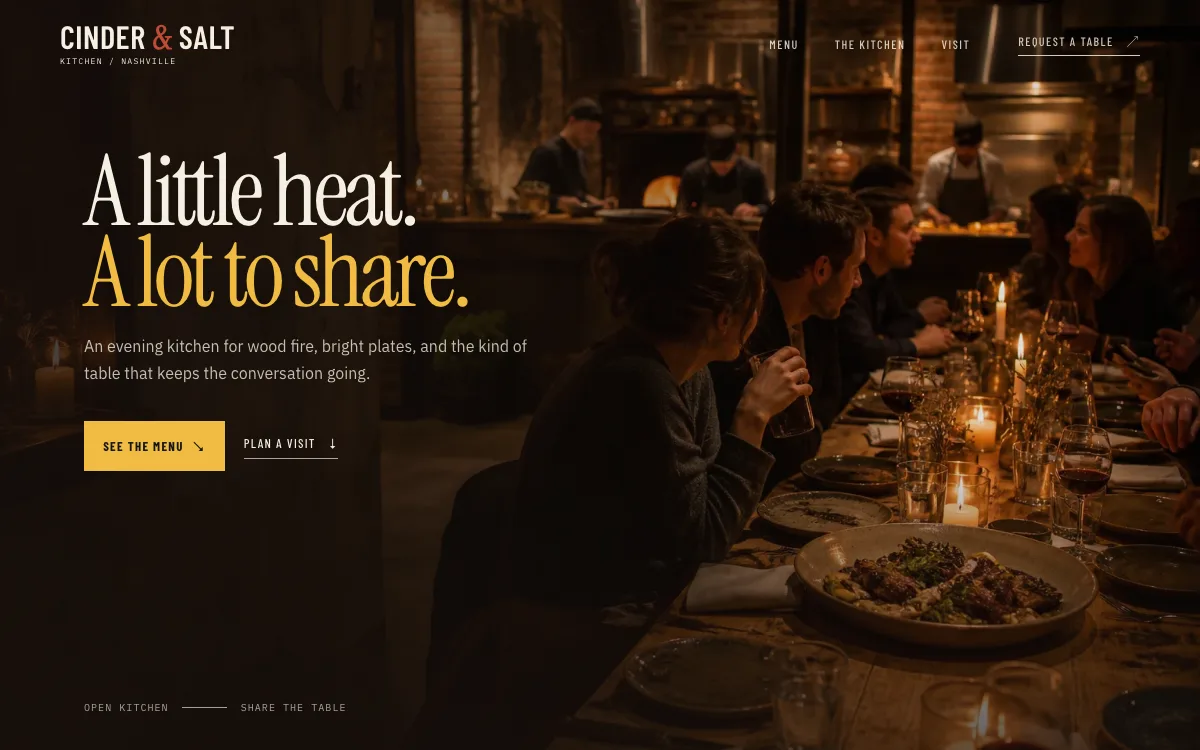
A menu switcher in real text
Menu sections sit behind tabs, each dish with its description and price as page text, not an image or a PDF. A diner on a phone taps between sections; a search engine reads every line.
-
A reservation button that never scrolls away
The "request a table" button lives in the header on every screen, so the decision to come in is one tap from any point on the page.
-
Hours, address and phone in one block
The visit section puts the hours, the location and a tap-to-call number together, with a note on allergens next to the menu. It answers the practical questions without a separate page.
Open the full restaurant website design example to click through it as a phone or desktop visitor would, or browse more restaurant and local shop website examples.
More designs for this kind of work
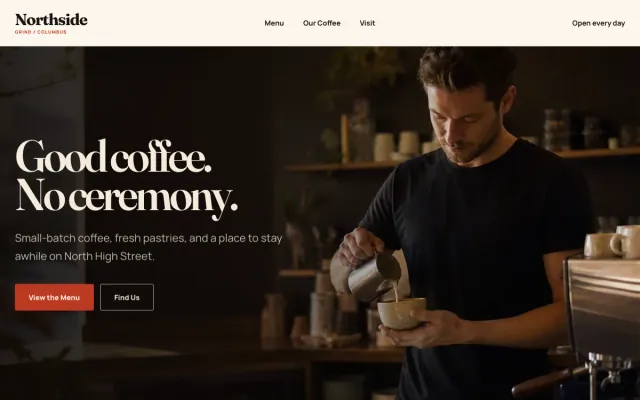
Coffee Shop Columbus, OH
Northside Grind - Coffee Shop website design example
Menu, hours, and directions front and center
- Menu with prices
- Hours & location
- Directions and call links
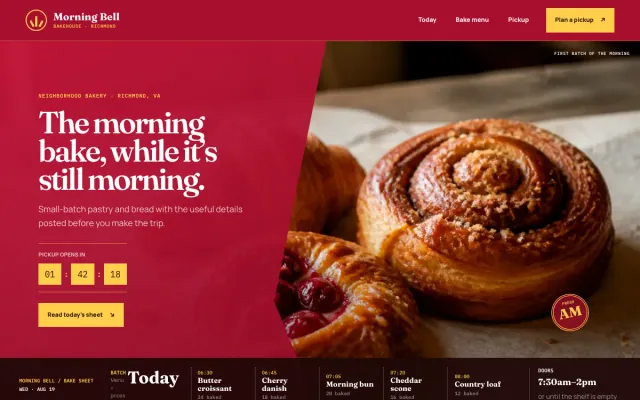
Bakery Richmond, VA
Morning Bell Bakehouse - Bakery website design example
Today’s bake, pickup rhythm, and neighborhood hours.
- Today’s bake sheet
- Menu filter and prices
- Pickup request rhythm
What to have ready for your brief
The brief takes about 3 minutes. Send what you have now; photos, documents and anything else on this list can follow by email.
- Your menus with prices and dietary notes, as text or a document we can type from
- Hours by day and holiday hours, plus any seasonal changes
- The reservation and ordering links you already use, such as OpenTable, Resy, DoorDash or Uber Eats, if any
- Photos of dishes, the room and the team; phone photos in daylight work
- Your catering or private-event offer and the questions you need answered to quote it
- Parking, transit, accessibility and anything a first-time guest should know
- A short story of the place and who cooks
- Your Google Business Profile link and social accounts
What customers check before they visit
- A current menu with prices, because a menu that is two years old or missing prices reads as a place that has stopped caring
- Hours that match Google and the door, since a wasted trip is what people write reviews about
- Photos of your actual food and room, taken recently, not stock plates
- A working reservation or order link; a dead link at 6 pm sends the table elsewhere
- Reviews on Google with replies from the owner, and the allergen and dietary notes that show you take the question seriously
What a restaurant website costs
A restaurant website from FreeWebGuy is $0 to build and $15 a month for hosting once you approve it: $180 for the first year, plus a domain if you need one.
| Route | What it costs | First year | Who builds it |
|---|---|---|---|
| DIY website builder | $17 to $49 a month, billed yearly | $204 to $588 | You build it |
| Freelance web designer | $2,000 to $7,600 to build, plus hosting | $2,060 to $7,900 | They build it |
| Web design agency | $5,000 to $15,000 to build, plus hosting | $5,060 to $15,300 | They build it |
| FreeWebGuy | $0 to build, $15 a month | $180, plus a domain if you need one | We build it |
Sources: Wix plans; Squarespace pricing; WebsiteSetup: small business website costs (updated November 22, 2025); Ueni: average cost for a website (updated September 22, 2026); Clutch: web designer pricing (updated September 21, 2026)
A menu in text, hours, order and reservation links, a gallery and a catering form all fit the standard build. Online ordering runs through the platform you choose, which charges its own fees; the site links to it.
The pricing page lists what the $15 plan includes and what costs extra. To price your own situation, use the website cost calculator or compare FreeWebGuy with Wix, Squarespace and web designers.
Prefer to build it yourself?
Building your own restaurant website works if you have the evenings for it. These five steps cover what the site needs on any website builder.
-
Choose a builder that lets you type the menu as text with prices; avoid uploading it as a PDF or an image.
-
Put hours, the address with a map link and a tap-to-call number at the top of the home page.
-
Add buttons to the reservation and ordering platforms you already use.
-
Photograph your food and room in daylight and add a catering inquiry form that asks for date, headcount and budget.
-
Match the hours on your Google Business Profile to the site, then open the menu on your own phone over cellular, not the kitchen Wi-Fi.
For a page-by-page checklist, read What should be on a small business website? A page-by-page checklist.
How FreeWebGuy builds it
-
Send the brief
About 3 minutes
Tell us what you do and what you want visitors to do.
You pay $0
-
We build it
Within 48 hours of your brief
We use AI to build fast. A person checks every first version before you see it.
You pay $0
-
You review the preview
At your pace
Open the private link and tell us what to change.
You pay $0
-
Approve and go live
When you decide
When you approve the preview, you set up your SMBcrm account and card for the $15 hosting plan.
You pay $15 a month starts here
If you are not ready to launch, you owe nothing.
Questions restaurants ask
Something else on your mind? Email hello@freewebguy.com. We reply within one business day.
How much does a restaurant website cost?
A restaurant website from FreeWebGuy is $0 to build and $15 a month for hosting after you approve it, so the first year is $180 plus a domain if you need one. No setup fee, no contract. The menu in text, hours, order and reservation links, gallery and catering form are all included.
How do I design a restaurant website?
Design it around the four things diners check: the menu, hours, location and photos. TouchBistro's 2024 U.S. Diner Trends Report found that 85% of diners always or often check the menu online before choosing a new restaurant. Put the menu in text with prices, hours and address at the top, order and reserve buttons in the header and real photos throughout.
How does a restaurant website link to DoorDash, Uber Eats or OpenTable?
With a button to each platform you use, in the header and on the menu page, opening your page on that service. The site sends the diner to the platform they prefer rather than replacing it. When you switch platforms, you change the link yourself in the site's AI builder.
How to create a restaurant website for free?
A free builder plan gets you a page on the builder's web address with its branding and no custom domain, which works for a pop-up and not much else. FreeWebGuy builds the full site from your brief for $0 and shows you a preview first; you pay $15 a month for hosting only once you approve it and go live, plus about $10 to $25 a year for a domain in your name.
Can a restaurant website take catering and private event inquiries?
Yes. A catering and events page describes what you offer, and an inquiry form asks for the date, headcount, budget range and the kind of event, then emails you. Those requests are worth more than a single reservation, so the form sits on the home page as well.
Does a restaurant website need online ordering built in?
No. Most restaurants already take orders through a platform or by phone, and the site links to it; a separate ordering system means a second menu to maintain and a second set of fees. If you later want direct ordering, small online stores are included when we confirm they fit your plan.
Related industries and guides
- Website for coffee shops Menu, hours and the feel of the room, readable on a phone.
- Website for bakeries What's in the case, custom-order requests and pickup details.
- Website for florists Occasions, delivery area and an order inquiry.
- How much does a small business website cost in 2026?
- Google Business Profile websites shut down: what to do now
- What should be on a small business website? A page-by-page checklist
- $0 to build
- First version within 48 hours of your brief
- $15 a month for hosting, only after you approve the preview and go live
- Month to month, no contract
When you approve the preview, you set up your SMBcrm account and card for the $15 hosting plan. That is the only time we ask for payment details.
