Websites for coffee shops
A website for your coffee shop, built for you
FreeWebGuy builds websites for coffee shops: $0 to build and $15 a month for hosting once you approve the site. The first version comes within 48 hours of your brief, with your menu as typed text, your hours and address where a phone visitor sees them first, and an order-ahead button if you take orders that way.
Pay nothing until you approve it.
About 3 minutes. No credit card.
What a coffee shop website has to do
-
Answer three questions before the visitor walks in
The person opening a coffee shop's website is usually nearby and deciding whether to come. They want to know if you are open right now, where exactly you are and what you serve. Hours, address and the menu belong at the top, each one tap away, with nothing to scroll past.
-
Make the menu something a phone can read
A photo of the chalkboard looks nice and reads badly. The menu on your site should be typed text with prices, the milks you carry, the food you have and what is seasonal this month. People check it before they come, and the visitor with a dairy allergy or a tight budget decides from it.
-
Show the room
A coffee shop sells a place as much as a drink. Someone picking where to meet a friend or sit with a laptop wants to see the seating, the light and the counter. Photos of your own shop on an ordinary morning answer that question before the visitor reads a word.
The pages we build for a coffee shop
Your brief decides the final list. These are the pages most coffee shops need, and the job each one does.
| Page | Why it is there |
|---|---|
| Home | Hours, address and a menu button at the top, with a photo of the room behind them. |
| Menu | Every drink and food item as text with a price, grouped like your board, with milks and seasonal specials. |
| Order ahead | A button that opens the ordering system you already use. Only if you take orders that way. |
| Hours and location | Hours by day, holiday closures, parking notes and a directions link that opens the visitor's maps app. |
| Our coffee | Who roasts it, where it comes from and how you brew it, for the visitor who cares. |
| Events and the back room | Open mics, cuppings, a book club, a room you rent. A reason for regulars to return to the site. |
| Beans, merch and office orders | Bags of coffee, mugs, gift cards and catering for meetings. Only if you sell them. |
| Contact | Email, phone, your Instagram and a short form for catering questions and the person who left a jacket. |
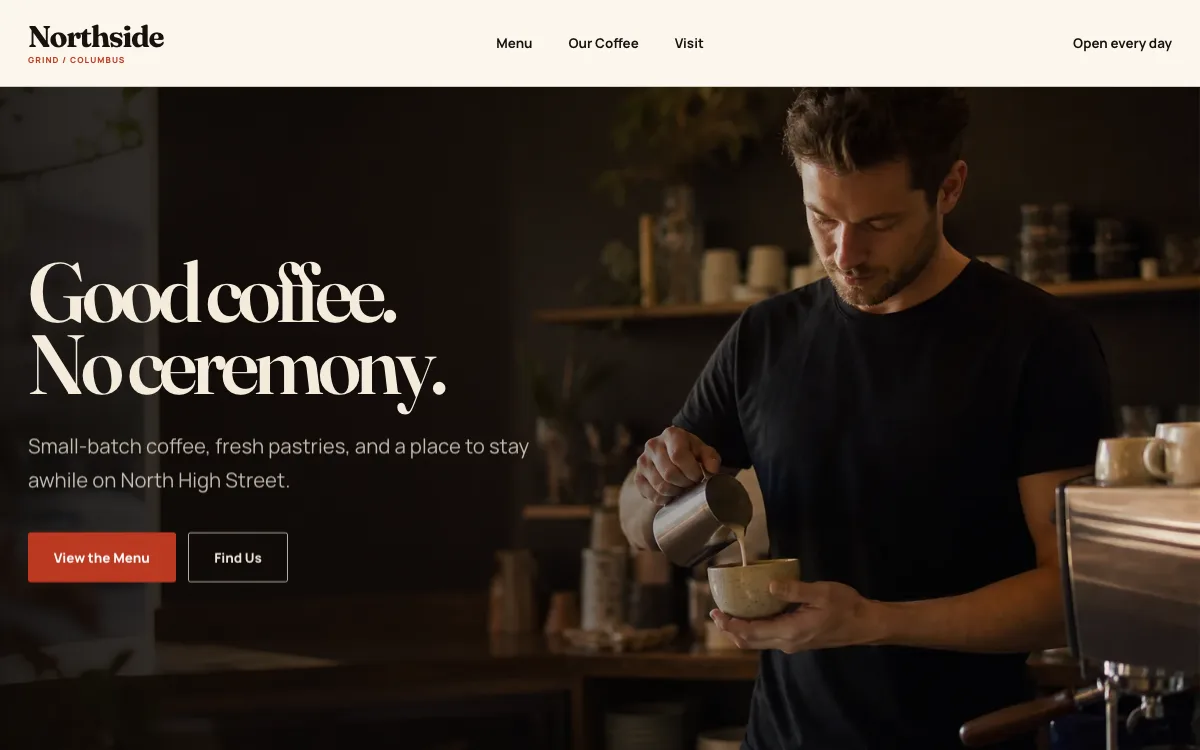
See a coffee shop website we designed
-
Menu and directions are the first two buttons
The design opens with a photo of the bar and two buttons: see the menu, find the shop. That is the whole decision a nearby visitor is making.
-
A menu in text, with prices
Drinks and food sit in two typed columns, each item with a short note and its price. A screen reader can read it, a search engine can index it, and a price change takes a minute.
-
Hours, address, directions and a call link in one block
The page ends with the practical facts together: street address, the week's hours, a link that opens the visitor's maps app and a link that dials the shop.
Open the full coffee shop website design example to click through it as a phone or desktop visitor would, or browse more restaurant and local shop website examples.
What to have ready for your brief
The brief takes about 3 minutes. Send what you have now; photos, documents and anything else on this list can follow by email.
- Your hours for each day of the week, and how you handle holidays
- Your address, with the parking or transit notes a first-time visitor needs
- Your full menu with prices, including milk options, sizes and anything seasonal
- The link to your order-ahead system, if you use one
- 6 to 10 photos of the room, the counter, your drinks and your food, taken in daylight
- Who roasts your coffee and what you want said about it
- Whether you sell beans, merchandise or gift cards, and whether you want to sell them online
- The small policies people ask about: Wi-Fi, laptops, dogs, the restroom, a loyalty card
- Your Google Business Profile and Instagram links
What customers check before they visit
- Hours on the site that match the hours on Google. In BrightLocal's 2025 Consumer Search Behavior survey, 85% of people called contact information and opening hours an important factor when researching a local business (BrightLocal, 2025).
- Photos of your own room and counter, so the visitor recognizes the place when they walk in
- A menu with prices, so nobody arrives expecting $3 drip and finds $7 pour-over
- A link to your Google reviews and your Instagram, where the shop is visibly alive this week
- An address and a directions link that opens their maps app
What a coffee shop website costs
A coffee shop website from FreeWebGuy is $0 to build and $15 a month for hosting once you approve it: $180 for the first year, plus a domain if you need one.
| Route | What it costs | First year | Who builds it |
|---|---|---|---|
| DIY website builder | $17 to $49 a month, billed yearly | $204 to $588 | You build it |
| Freelance web designer | $2,000 to $7,600 to build, plus hosting | $2,060 to $7,900 | They build it |
| Web design agency | $5,000 to $15,000 to build, plus hosting | $5,060 to $15,300 | They build it |
| FreeWebGuy | $0 to build, $15 a month | $180, plus a domain if you need one | We build it |
Sources: Wix plans; Squarespace pricing; WebsiteSetup: small business website costs (updated November 22, 2025); Ueni: average cost for a website (updated September 22, 2026); Clutch: web designer pricing (updated September 21, 2026)
A coffee shop site with a menu, hours, photos and an order-ahead link fits the standard build. Selling beans or gift cards online is included when we confirm it fits your plan, and your payment processor charges its own fees on those sales.
The pricing page lists what the $15 plan includes and what costs extra. To price your own situation, use the website cost calculator or compare FreeWebGuy with Wix, Squarespace and web designers.
Prefer to build it yourself?
Building your own coffee shop website works if you have the evenings for it. These five steps cover what the site needs on any website builder.
-
Pick a website builder and put your hours, address and a menu link at the top, above any photo slideshow.
-
Type out your menu with prices and milk options. Do not upload a photo of the board as the menu.
-
Add 6 to 10 photos of your own shop, taken in the morning when the room looks like itself.
-
Add a directions link, a tap-to-call link and, if you take orders ahead, a button that opens your ordering system.
-
Link the site from your Google Business Profile and Instagram, then check it on your phone outside the shop.
For a page-by-page checklist, read What should be on a small business website? A page-by-page checklist.
How FreeWebGuy builds it
-
Send the brief
About 3 minutes
Tell us what you do and what you want visitors to do.
You pay $0
-
We build it
Within 48 hours of your brief
We use AI to build fast. A person checks every first version before you see it.
You pay $0
-
You review the preview
At your pace
Open the private link and tell us what to change.
You pay $0
-
Approve and go live
When you decide
When you approve the preview, you set up your SMBcrm account and card for the $15 hosting plan.
You pay $15 a month starts here
If you are not ready to launch, you owe nothing.
Questions coffee shops ask
Something else on your mind? Email hello@freewebguy.com. We reply within one business day.
How much does a coffee shop website cost?
A coffee shop website from FreeWebGuy is $0 to build and $15 a month for hosting once you approve it, which comes to $180 for the first year plus a domain if you need one. No setup fee, no contract, and you see the finished site before you pay anything. The pricing page lists what is included.
What should a coffee shop website include?
Hours, address and a menu with prices, all reachable from the first screen on a phone. After that: photos of the room, an order-ahead button if you take orders that way, a short page about your coffee, and your Instagram and Google links. Most coffee shops need 4 to 6 pages.
Does a coffee shop website need online ordering?
Only if customers already order ahead from you. If they do, the site gets a button that opens the ordering system you use, so you keep one order queue. If they do not, a clear menu and hours do the job.
Can a coffee shop website sell beans and merchandise?
Yes. A small store for bags of coffee, mugs and gift cards is included when we confirm it fits your plan, and we say so before any work starts. Your payment processor takes its usual fee on each sale. A large catalog is quoted separately before we begin.
How do I keep seasonal drinks and holiday hours current on the site?
You edit them yourself with the site's AI builder, which takes about as long as writing the new drink on the board. Put holiday hours on the hours page and on your Google Business Profile at the same time, because people check both and notice when they disagree.
Do I need a website if my coffee shop is already on Instagram and Google Maps?
Instagram shows what the shop looked like last week and Google Maps shows where it is. Neither holds a full menu with prices, your story or an ordering button, and neither is yours. The website is the one place you control, and both profiles should link to it. Our guide on when a Google Business Profile is enough goes deeper.
Related industries and guides
- Website for bakeries What's in the case, custom-order requests and pickup details.
- Website for restaurants A menu in real text, hours, location and your order and reservation links.
- Website for florists Occasions, delivery area and an order inquiry.
- How much does a small business website cost in 2026?
- Google Business Profile websites shut down: what to do now
- What should be on a small business website? A page-by-page checklist
- $0 to build
- First version within 48 hours of your brief
- $15 a month for hosting, only after you approve the preview and go live
- Month to month, no contract
When you approve the preview, you set up your SMBcrm account and card for the $15 hosting plan. That is the only time we ask for payment details.
