Websites for HVAC companies
A website for your heating and cooling company, built for you
FreeWebGuy builds websites for HVAC companies: $0 to build, and $15 a month for hosting only after you approve the site. The first version arrives within 48 hours of your brief, built to lead with the season's work and give your maintenance plans their own page.
Pay nothing until you approve it.
About 3 minutes. No credit card.
What an HVAC website has to do
-
Lead with the season
Demand flips twice a year. In summer the home page leads with AC repair and tune-ups; when it turns cold, furnaces and heat pumps take the top spot. You switch the lead service with the site's AI builder and nothing else has to change.
-
Answer the no-cooling call fast
A family with no air conditioning in July calls the first company that looks ready to come out. A call button in the header, your hours and a short repair request do that job on a phone, with one thumb.
-
Sell the maintenance plan
Maintenance plans keep technicians busy between the peaks. A plan page that spells out what each visit covers and what members get turns a one-time repair customer into someone who hears from you every spring and fall.
The pages we build for a heating and cooling company
Your brief decides the final list. These are the pages most HVAC companies need, and the job each one does.
| Page | Why it is there |
|---|---|
| Home | Leads with the service the season calls for, with call and request buttons at the top of the screen. |
| AC repair | For the customer whose system stopped cooling: symptoms in plain words, what a visit involves and how to reach you. |
| Heating repair | Furnaces, heat pumps or boilers, whichever you work on, written for the first cold night of the year. |
| Replacement and installation | For the customer comparing new systems over a few weeks: brands you install, how sizing works and financing if you offer it. |
| Maintenance plans | What each visit covers, what members get and how to sign up. |
| Indoor air quality | Filters, humidifiers and duct work, if you do it. Left off the site if you don't. |
| Financing | Your financing partner and how to apply, if you offer it, because a new system is a large purchase. |
| Service area | The towns and ZIP codes you cover, in text. |
| Request service | A short form that asks for repair, tune-up or replacement, plus enough detail to call back prepared. |
See an HVAC website we designed
-
Three situations, three next steps
Urgent AC repair, a seasonal tune-up or replacement planning. The visitor picks the one closest to their day and gets a short explanation and a way to ask about it.
-
A service button that follows the visitor
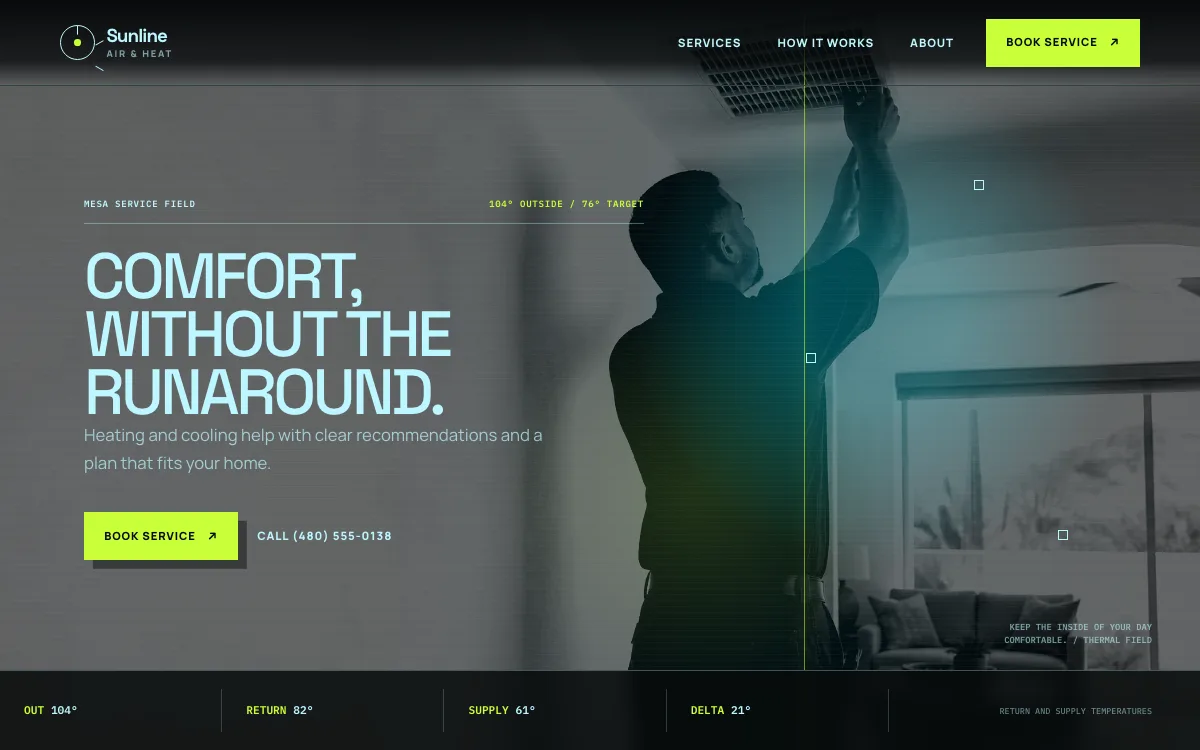
The header keeps a service button on screen as the page scrolls, and the hero pairs it with a call button. That matters when the person reading is standing in a hot house holding a phone.
-
A process that removes the pressure
Describe the issue, get a clear recommendation, choose the timing. The three steps tell a customer they will not be pushed into a new system on the first visit.
Open the full HVAC website design example to click through it as a phone or desktop visitor would, or browse more home service website examples.
What to have ready for your brief
The brief takes about 3 minutes. Send what you have now; photos, documents and anything else on this list can follow by email.
- License numbers for your state or city, if you hold them
- Certifications your technicians hold, such as NATE or EPA Section 608
- The equipment brands you install and service
- Emergency hours and the number to call, if you offer after-hours service
- Your maintenance plans: names, prices and what each visit includes
- Your financing partner and how customers apply, if you offer financing
- The towns or ZIP codes you cover
- Photos of your vans, your technicians and finished installs
What customers check before they call
- License numbers and technician certifications, if you hold them, written out so a homeowner can check them
- A plain explanation of repair versus replace, so the first visit doesn't feel like a sales call
- Diagnostic or trip fees stated up front, if you charge them
- Financing terms they can read before anyone visits, if you offer financing
- Reviews that mention response time and how the technician explained the problem
What an HVAC website costs
An HVAC website from FreeWebGuy is $0 to build and $15 a month for hosting once you approve it: $180 for the first year, plus a domain if you need one.
| Route | What it costs | First year | Who builds it |
|---|---|---|---|
| DIY website builder | $17 to $49 a month, billed yearly | $204 to $588 | You build it |
| Freelance web designer | $2,000 to $7,600 to build, plus hosting | $2,060 to $7,900 | They build it |
| Web design agency | $5,000 to $15,000 to build, plus hosting | $5,060 to $15,300 | They build it |
| FreeWebGuy | $0 to build, $15 a month | $180, plus a domain if you need one | We build it |
Sources: Wix plans; Squarespace pricing; WebsiteSetup: small business website costs (updated November 22, 2025); Ueni: average cost for a website (updated September 22, 2026); Clutch: web designer pricing (updated September 21, 2026)
A maintenance plan page and seasonal home page sections are part of a normal HVAC build. If you take plan payments online, the payment processor's fees are the only addition.
The pricing page lists what the $15 plan includes and what costs extra. To price your own situation, use the website cost calculator or compare FreeWebGuy with Wix, Squarespace and web designers.
Prefer to build it yourself?
Building your own HVAC website works if you have the evenings for it. These five steps cover what the site needs on any website builder.
-
Choose a builder that makes the home page headline easy to change, because you will change it at least twice a year.
-
Write separate pages for cooling, heating, replacement and your maintenance plan.
-
Put your phone number and a request button in the header, then check both on a phone.
-
Add your license and certifications if you hold them, plus your financing partner's application link if you offer financing.
-
Put the new address on your Google Business Profile, and update your hours there whenever they change for the season.
For a page-by-page checklist, read What should be on a small business website? A page-by-page checklist.
How FreeWebGuy builds it
-
Send the brief
About 3 minutes
Tell us what you do and what you want visitors to do.
You pay $0
-
We build it
Within 48 hours of your brief
We use AI to build fast. A person checks every first version before you see it.
You pay $0
-
You review the preview
At your pace
Open the private link and tell us what to change.
You pay $0
-
Approve and go live
When you decide
When you approve the preview, you set up your SMBcrm account and card for the $15 hosting plan.
You pay $15 a month starts here
If you are not ready to launch, you owe nothing.
Questions HVAC companies ask
Something else on your mind? Email hello@freewebguy.com. We reply within one business day.
How much does an HVAC website cost?
With FreeWebGuy an HVAC website is $0 to build, then $15 a month for hosting after you approve it. Year one is $180 plus a domain if you need one. Maintenance plan and financing pages come with the build, not as extras.
What makes a good HVAC website design?
A good HVAC site works for the panicked caller and the patient shopper at once. It puts the phone and a service request at the top and leads with the season's work. Repair, replacement and maintenance get their own pages, and licenses, financing and reviews sit where nobody has to hunt for them.
Why do HVAC companies need a custom website?
Because seasons, service areas, equipment brands and maintenance plans differ from one company to the next, and a generic layout has nowhere to put them. A site planned around your plans, brands and area answers the questions your own customers ask before they call.
Should I put maintenance plan prices on my HVAC website?
If your prices are fixed, yes. A customer comparing plans wants to see what a visit covers and what it costs before calling. If prices depend on the number of systems or the size of the home, show a starting price and say what changes it.
How should an HVAC website handle emergency calls?
Make the phone number the first thing on a phone screen, state your emergency hours and any after-hours fee, and keep the request form short for people who can't talk right now. If you don't offer after-hours service, say so, so nobody waits up for a callback.
Can one website cover both heating and cooling?
Yes. One site with separate pages for cooling, heating and replacement works better than two sites, and the home page can switch its lead service with the season. Customers who need both find everything in one place, and your reviews stay together.
How do I show financing on an HVAC website?
Name your financing partner, describe the terms in a sentence or two and link to the application from the replacement page and a financing page. Show only offers you can honor, and keep any wording your lender requires.
Related industries and guides
- Website for plumbers Two paths: the leak that needs a call now and the remodel that needs a quote.
- Website for electricians Separate paths for repairs, panel and capacity upgrades, and lighting projects.
- Website for roofers An inspection request, a step-by-step process and photos of roofs you have finished.
- How much does a small business website cost in 2026?
- Local SEO checklist for service businesses
- How to get Google reviews and show them on your website
- $0 to build
- First version within 48 hours of your brief
- $15 a month for hosting, only after you approve the preview and go live
- Month to month, no contract
When you approve the preview, you set up your SMBcrm account and card for the $15 hosting plan. That is the only time we ask for payment details.
