Websites for electricians
A website for your electrical business, built for you
FreeWebGuy designs and builds websites for electricians. It's $0 to build, and hosting is $15 a month once you approve the site. You get a first version within 48 hours of your brief, laid out so repair calls, panel upgrades and lighting projects each land on their own page.
Pay nothing until you approve it.
About 3 minutes. No credit card.
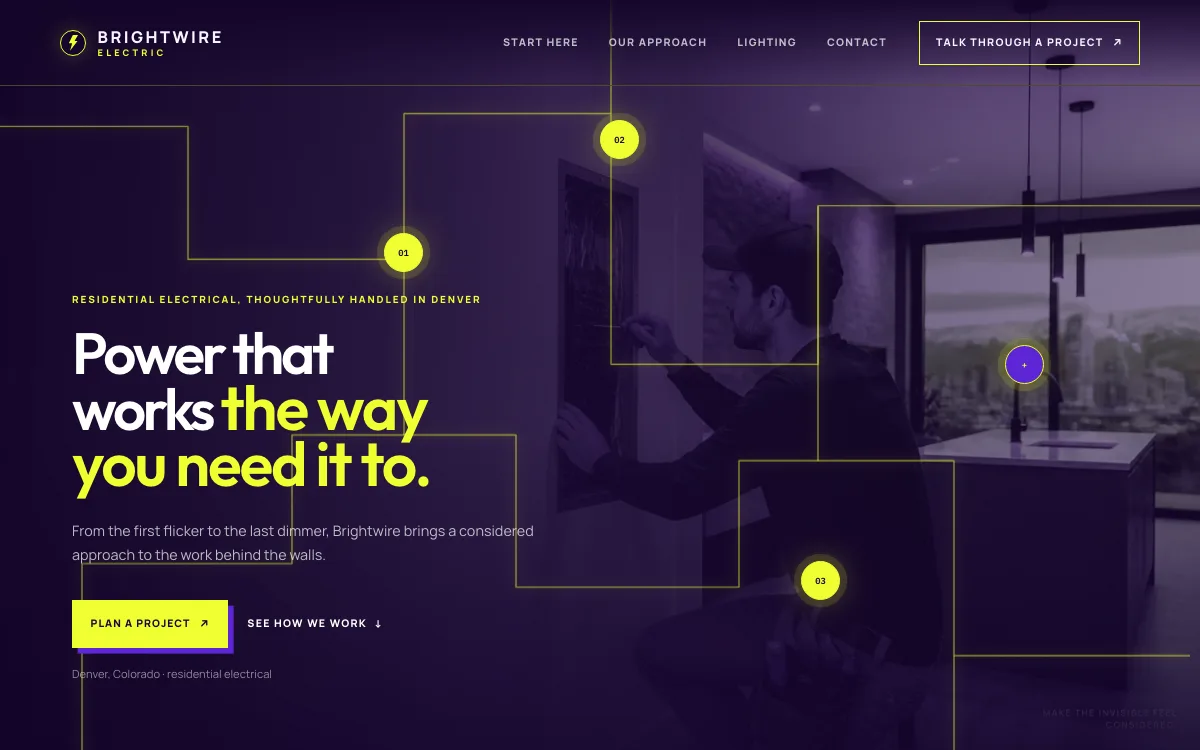
What an electrician website has to do
-
Split repairs from projects
A dead outlet and a panel upgrade are two different customers. One wants someone this week. The other is comparing quotes on a job that may need a permit and an inspection. Each gets its own path from the home page, so neither has to dig through the other's information.
-
Show the work behind the walls
Most electrical work disappears once the drywall closes. Photos of clean panels, tidy runs and finished lighting, each with a line on what the job involved, show the care a customer cannot see afterwards.
-
Make the license easy to find
Many states and cities license electricians, and a wiring mistake costs more than a dripping tap. Your license number, insurance and how you handle permits belong where a careful homeowner looks for them: next to the request form and in the footer.
The pages we build for an electrical business
Your brief decides the final list. These are the pages most electricians need, and the job each one does.
| Page | Why it is there |
|---|---|
| Home | Three starting points from the first screen: fix something, add capacity, or improve the lighting. |
| Repairs and troubleshooting | Flickering lights, dead outlets, breakers that keep tripping. The problems people type into a search bar, named in their words. |
| Panel and capacity upgrades | Panel replacements, new circuits and service upgrades for a kitchen, an addition or a heat pump. |
| EV chargers and generators | Its own page if you install them, because customers search for these by name. Left out if you don't. |
| Lighting | Interior, exterior and landscape lighting, with photos, because people choose this work with their eyes. |
| Commercial work | A page for tenant fit-outs and service calls if you do them, so a property manager can see they're in the right place. |
| Service area | The towns or ZIP codes you cover, and whether you travel farther for larger jobs. |
| About and licensing | Your license number, insurance if you carry it, how you handle permits and who will turn up at the door. |
| Request a project | A form that asks which kind of work it is, so a repair request never gets buried under a quote request. |
See an electrician website we designed
-
Three project paths
Fix it, add capacity, light it right. The design asks what needs to change and shows a short plan for each choice before the visitor ever reaches a form.
-
A lighting control the visitor can play with
A slider moves a room from daylight to an evening scene. It lets a lighting customer try the idea before they call, and it points at the work the shop wants more of.
-
A request form that knows the job type
The project request asks whether it's a fix, more capacity or lighting, so you can sort messages before you call anyone back.
Open the full electrician website design example to click through it as a phone or desktop visitor would, or browse more home service website examples.
What to have ready for your brief
The brief takes about 3 minutes. Send what you have now; photos, documents and anything else on this list can follow by email.
- Your license number and the state or city that issued it
- Insurance and bonding, if you carry them
- The work you want more of, ranked: repairs, panels, EV chargers, generators, lighting, commercial
- Whether you take emergency calls, and the hours and number for them
- How you handle permits and inspections, in a sentence or two
- The towns or ZIP codes you serve
- Charger and generator brands you install, and any manufacturer certification you hold
- Photos of finished panels, lighting and clean installs. Phone photos work.
What customers check before they call
- A license number they can look up with the state or city, if yours issues one
- Insurance stated plainly, if you carry it
- A straight answer on permits: who pulls them and whether the work gets inspected
- Photos of your own work instead of stock pictures of sparks and hard hats
- Reviews from customers who hired you for the same kind of job, whether a panel swap or new lighting
What an electrician website costs
An electrician website from FreeWebGuy is $0 to build and $15 a month for hosting once you approve it: $180 for the first year, plus a domain if you need one.
| Route | What it costs | First year | Who builds it |
|---|---|---|---|
| DIY website builder | $17 to $49 a month, billed yearly | $204 to $588 | You build it |
| Freelance web designer | $2,000 to $7,600 to build, plus hosting | $2,060 to $7,900 | They build it |
| Web design agency | $5,000 to $15,000 to build, plus hosting | $5,060 to $15,300 | They build it |
| FreeWebGuy | $0 to build, $15 a month | $180, plus a domain if you need one | We build it |
Sources: Wix plans; Squarespace pricing; WebsiteSetup: small business website costs (updated November 22, 2025); Ueni: average cost for a website (updated September 22, 2026); Clutch: web designer pricing (updated September 21, 2026)
Separate pages for panels, EV chargers, generators and lighting are all part of the standard build, so an electrician site with nine pages costs the same $15 a month as a site with five.
The pricing page lists what the $15 plan includes and what costs extra. To price your own situation, use the website cost calculator or compare FreeWebGuy with Wix, Squarespace and web designers.
Prefer to build it yourself?
Building your own electrician website works if you have the evenings for it. These five steps cover what the site needs on any website builder.
-
Choose a builder with a contact form and a click-to-call button, and register a domain in your business's name.
-
Make separate pages for repairs, capacity upgrades and lighting instead of one long list of everything you do.
-
Put your license number in the footer of every page if you hold one, and check whether your state requires it in advertising.
-
Add photos of finished work, each with a sentence on what the job involved.
-
Add the site to your Google Business Profile, then fill in the request form yourself to confirm it reaches your inbox.
For a page-by-page checklist, read What should be on a small business website? A page-by-page checklist.
How FreeWebGuy builds it
-
Send the brief
About 3 minutes
Tell us what you do and what you want visitors to do.
You pay $0
-
We build it
Within 48 hours of your brief
We use AI to build fast. A person checks every first version before you see it.
You pay $0
-
You review the preview
At your pace
Open the private link and tell us what to change.
You pay $0
-
Approve and go live
When you decide
When you approve the preview, you set up your SMBcrm account and card for the $15 hosting plan.
You pay $15 a month starts here
If you are not ready to launch, you owe nothing.
Questions electricians ask
Something else on your mind? Email hello@freewebguy.com. We reply within one business day.
How much does an electrician website cost?
An electrician website from FreeWebGuy is $0 to build. Hosting is $15 a month once you approve the preview and go live, so year one comes to $180 plus a domain if you need one. Pages for panels, EV chargers or lighting do not change the price.
How do I create a website for an electrician?
Start with the work you want more of. Give repairs, panel and capacity upgrades and lighting their own pages, show your license and insurance, list the area you cover, and end every page with a way to call or request a project. FreeWebGuy builds all of that from a 3-minute brief.
What are the best practices for electrician website design?
Keep a phone number and a request button in reach on small screens, and name each service the way customers search for it. Use photos of your own finished work, put the license number where people look for it, and keep the request form to a few questions so people finish it.
Should you build your own electrician website?
You can, if you have the evenings and want full control: you write, design and update every page yourself. Builder plans usually cost as much per month as FreeWebGuy hosting or more, and the cost table on this page compares the routes. If you would rather spend that time on jobs, have it built for you.
How should an electrician show a license on a website?
Put the license number and the issuing state or city in the footer of every page and on the about page, if you hold one. Some states require it in advertising. California, for example, requires a contractor's license number in all advertising under Bus. & Prof. Code 7030.5, which is why the brief asks for both.
Should residential and commercial electrical work have separate pages?
Yes, if you do both. A homeowner and a property manager ask different questions and use different words, so each gets a page with its own examples and its own request path. If commercial work is a small share of your jobs, a section on the services page is enough.
Can customers send photos of an electrical problem through the website?
Yes. The request form can include a photo upload, which lets you see a scorched outlet or an old panel before you quote. If you would rather keep the form short, customers can reply to your email with pictures instead.
Related industries and guides
- Website for plumbers Two paths: the leak that needs a call now and the remodel that needs a quote.
- Website for HVAC companies Lead with the season's work and give maintenance plans their own page.
- Website for contractors Finished projects first, and a process page that answers questions before the first meeting.
- How much does a small business website cost in 2026?
- What should be on a small business website? A page-by-page checklist
- How to get Google reviews and show them on your website
- $0 to build
- First version within 48 hours of your brief
- $15 a month for hosting, only after you approve the preview and go live
- Month to month, no contract
When you approve the preview, you set up your SMBcrm account and card for the $15 hosting plan. That is the only time we ask for payment details.
