Websites for nonprofits
A website for your nonprofit, built for you
FreeWebGuy builds websites for nonprofits: $0 to build and $15 a month for hosting once you approve the site. The first version comes within 48 hours of your brief. It says what you do and for whom in one sentence, gives donors and volunteers each their own button, and puts the facts funders check where they look.
Pay nothing until you approve it.
About 3 minutes. No credit card.
What a nonprofit website has to do
-
Say what you do and who it is for
A visitor opens a nonprofit's home page with two questions: what do you do, and who is it for. Mission statements written for a grant application fail that test. The opening needs one short sentence, the programs named the way a neighbor would name them, and a photograph of the work happening.
-
Give every kind of supporter a door
Donors, volunteers, people who need your services, partners and journalists all arrive at the same page wanting different things. A donate button, a volunteer form, a get-help path and a press contact each need to be findable at once, without the donor reading the volunteer schedule first.
-
Show the work and the proof
Funders and careful donors look for the same things: your legal status, who runs the organization, where the money goes and evidence that the programs happen. Stories and photos from the field carry the first half; an About page with your board, your EIN and your annual report or Form 990 carries the second.
The pages we build for a nonprofit
Your brief decides the final list. These are the pages most nonprofits need, and the job each one does.
| Page | Why it is there |
|---|---|
| Home | One sentence on what you do and for whom, the programs, a donate button, a volunteer button and a photo from the work. |
| Programs | One page per program: who it serves, what happens, when and where, how to take part or refer someone. |
| Donate | What a gift pays for, the button that opens your donation processor and your tax-deductibility line if you hold 501(c)(3) status. |
| Volunteer | Roles, time commitments, requirements and an interest form. |
| Events | Workdays, fundraisers and community meetings with dates, places and a way to sign up. |
| About and governance | Mission, history, staff and board names, your EIN and a link to your annual report or Form 990. |
| Stories and news | Short field notes from the programs, in the voice of the people doing the work. |
See a nonprofit website we designed
-
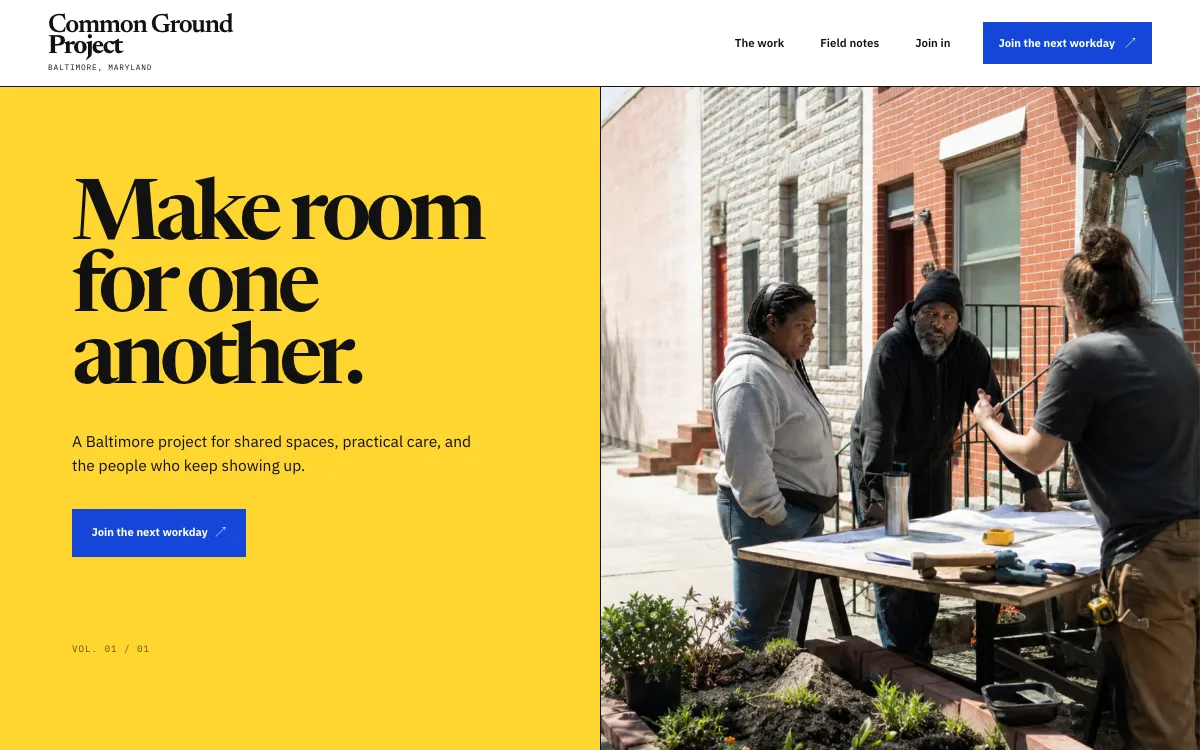
The mission in one line, with a workday button
The design opens with a short invitation, one sentence on what the project is for, and a single button to join the next workday.
-
Programs as an expanding list
Each program sits in a list that opens on click: a name, a line on what it is, and a short note on how to take part. A visitor scans all of them in one screen and opens the one that fits.
-
Field notes and a volunteer interest form
A field-note section lets the visitor pick an edition and read a short story. The page ends with a form that asks for a name, an email and what the person wants to help with.
Open the full nonprofit website design example to click through it as a phone or desktop visitor would, or browse more lessons, community and event website examples.
What to have ready for your brief
The brief takes about 3 minutes. Send what you have now; photos, documents and anything else on this list can follow by email.
- Your mission in one sentence, and the longer version if you have one
- Each program in two or three sentences: who it serves, what happens, when and where
- Your donation processor link and whether you take recurring gifts
- Your EIN and whether you hold 501(c)(3) status, so the donate page can say what the IRS letter says
- Volunteer roles, time commitments, requirements and the person who follows up
- Board and staff names and titles, with photos if you have them
- A link to your annual report, Form 990 or Candid profile, if you publish one
- 15 to 25 photos from your programs, with the consent of the people pictured
What customers check before they reach out
- Your EIN and your 501(c)(3) status, stated if you hold it, on the donate page and the About page
- Board and staff names, because donors want to see who is accountable for the money
- Where the money goes: an annual report, Form 990 or a simple breakdown, linked instead of summarized in adjectives
- Photographs of your programs showing the participants and volunteers, with their consent
- A mailing address and a named contact who replies
- State charity registration where you solicit, if your state requires it, named without fuss on the donate page
What a nonprofit website costs
A nonprofit website from FreeWebGuy is $0 to build and $15 a month for hosting once you approve it: $180 for the first year, plus a domain if you need one.
| Route | What it costs | First year | Who builds it |
|---|---|---|---|
| DIY website builder | $17 to $49 a month, billed yearly | $204 to $588 | You build it |
| Freelance web designer | $2,000 to $7,600 to build, plus hosting | $2,060 to $7,900 | They build it |
| Web design agency | $5,000 to $15,000 to build, plus hosting | $5,060 to $15,300 | They build it |
| FreeWebGuy | $0 to build, $15 a month | $180, plus a domain if you need one | We build it |
Sources: Wix plans; Squarespace pricing; WebsiteSetup: small business website costs (updated November 22, 2025); Ueni: average cost for a website (updated September 22, 2026); Clutch: web designer pricing (updated September 21, 2026)
A nonprofit site with programs, a donate link, a volunteer form, events and a governance page fits the standard build. Donation processors charge their own fees on gifts, and the site links to the processor you choose rather than handling the money itself.
The pricing page lists what the $15 plan includes and what costs extra. To price your own situation, use the website cost calculator or compare FreeWebGuy with Wix, Squarespace and web designers.
Prefer to build it yourself?
Building your own nonprofit website works if you have the evenings for it. These five steps cover what the site needs on any website builder.
-
Pick a website builder and write the mission in one sentence first.
-
Write one page per program, and an About page with board names, your EIN and a link to your annual report or Form 990.
-
Set up a donation processor and put its button in the header and on a donate page that says what a gift pays for.
-
Add a volunteer interest form that asks what the person wants to help with and when they are free, and name who follows up.
-
Add the site to your Google Business Profile and social profiles, then send a test donation and a test volunteer form.
For a page-by-page checklist, read What should be on a small business website? A page-by-page checklist.
How FreeWebGuy builds it
-
Send the brief
About 3 minutes
Tell us what you do and what you want visitors to do.
You pay $0
-
We build it
Within 48 hours of your brief
We use AI to build fast. A person checks every first version before you see it.
You pay $0
-
You review the preview
At your pace
Open the private link and tell us what to change.
You pay $0
-
Approve and go live
When you decide
When you approve the preview, you set up your SMBcrm account and card for the $15 hosting plan.
You pay $15 a month starts here
If you are not ready to launch, you owe nothing.
Questions nonprofits ask
Something else on your mind? Email hello@freewebguy.com. We reply within one business day.
How much does a nonprofit website cost?
A nonprofit website from FreeWebGuy is $0 to build and $15 a month for hosting once you approve it, so the first year is $180 plus a domain if you need one. No setup fee and no contract, and the board sees the finished preview before anyone pays. Your donation processor's fees are separate. The pricing page lists what is included.
What is a good nonprofit website design?
A good nonprofit website design says what the organization does and for whom in its first sentence. It gives donors, volunteers and the people you serve each a clear path, shows the work in photographs and stories, and puts the proof funders look for (board, EIN, financials) one click from the home page.
Are there free website builders for nonprofits?
Yes, with the same catch a business meets: on a free do-it-yourself plan a custom domain needs a paid plan, and a staff member or volunteer builds and maintains the site. Wix's own plan page, checked October 14, 2026, puts its entry plan at $17 a month billed yearly (how FreeWebGuy compares with Wix).
How to create a website for a non-profit organization?
Start with the one-sentence mission and a list of programs. Add a donate page linked to a processor, a volunteer form, an About page with the board and your EIN, and photos from the work. Then build it yourself on a website builder over a few weeks, or send FreeWebGuy a 3-minute brief and review the first version within 48 hours of your brief. See how it works.
How do donations work on a nonprofit website?
The donate button opens the processor you choose, such as Givebutter, Donorbox, Zeffy, PayPal or Stripe, and the money goes to your account through them. The website never holds card details. Each processor charges its own fees; compare them before you pick.
What should a nonprofit website say about tax-deductible gifts?
State your EIN and, if you hold it, that you are a 501(c)(3) organization and gifts are deductible to the extent the law allows. Many states also require a charity to register before asking their residents for donations, and whether a donate button on a website counts as asking depends on the state; the National Association of State Charity Officials lists each state's office.
Can volunteers sign up through the website?
Yes. A volunteer page lists the roles, the time each takes and any requirements, and an interest form asks what the person wants to help with, when they are available and how to reach them. Each submission emails your volunteer coordinator. If you run shifts through a scheduling tool, the page links to it.
Related industries and guides
- Website for tutors Subjects, grade levels and a request for a first session.
- Website for coffee shops Menu, hours and the feel of the room, readable on a phone.
- Website for florists Occasions, delivery area and an order inquiry.
- How much does a small business website cost in 2026?
- Is a free website really free?
- How to write website copy for a local business
- $0 to build
- First version within 48 hours of your brief
- $15 a month for hosting, only after you approve the preview and go live
- Month to month, no contract
When you approve the preview, you set up your SMBcrm account and card for the $15 hosting plan. That is the only time we ask for payment details.
