Websites for tutors
A website for your tutoring business, built for you
FreeWebGuy builds websites for tutors: $0 to build and $15 a month for hosting once you approve the site. The first version comes within 48 hours of your brief. It names your subjects and levels, shows how you teach, states your rates, and ends with a short intro-session request instead of asking a parent to buy ten sessions blind.
Pay nothing until you approve it.
About 3 minutes. No credit card.
What a tutor website has to do
-
Speak to the parent and the student at the same time
The parent is the one searching at 9 p.m. after a bad report card, and the parent pays. The student is the one who has to want to show up next Tuesday. The site has to reassure the parent with credentials, structure, rates and progress reports. It also has to speak to the student: the tone, a sense of what a session is like, no shame about being stuck.
-
Show how you teach
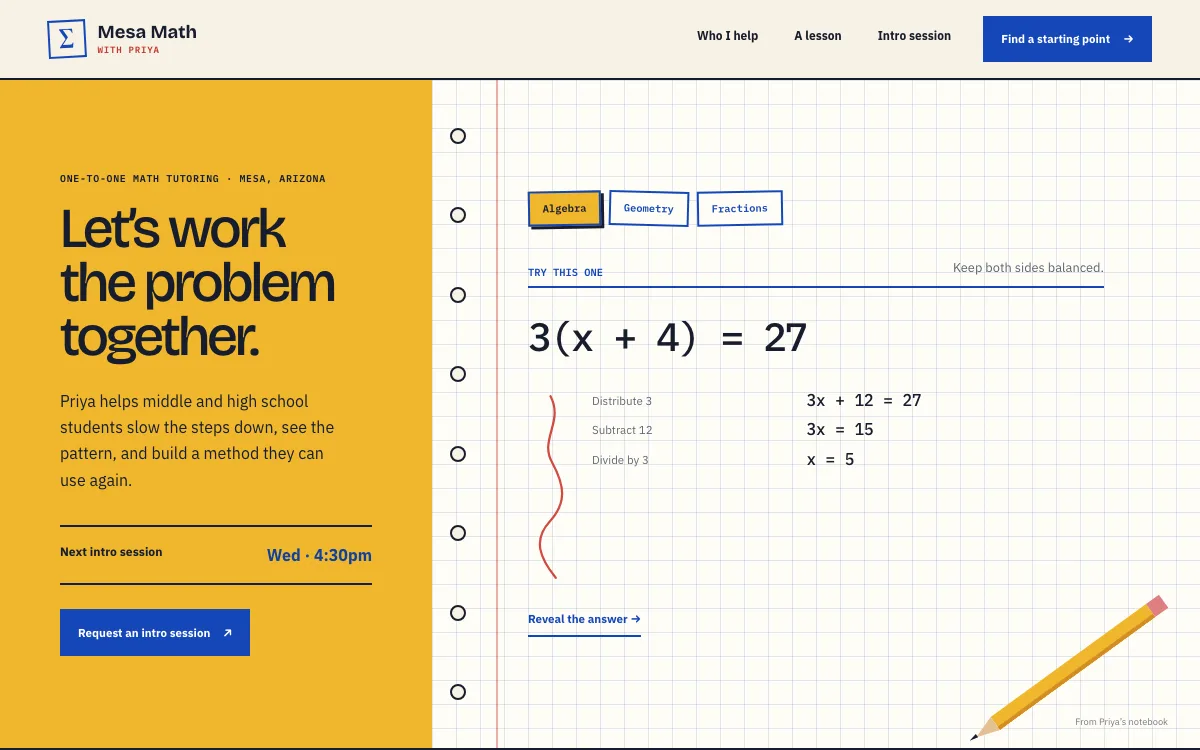
Tutoring sites tend to say "patient" and "experienced" and stop there. Show the teaching instead: a worked problem, the shape of a lesson, the way a session opens, written the way you would say it out loud. A parent learns more from that than from adjectives, and a directory listing cannot copy it.
-
Make the first step small
A family deciding on a tutor is deciding on a stranger. A short intro session, 20 minutes, is far easier to say yes to than a package. The site's main button asks for that and nothing more.
The pages we build for a tutoring business
Your brief decides the final list. These are the pages most tutors need, and the job each one does.
| Page | Why it is there |
|---|---|
| Home | Who you teach, what subjects, where (in person, online or both) and the intro-session button, with a photo of you. |
| Subjects and levels | One page per subject you want more of, stating the levels you cover and the problems you usually see. |
| How a session works | Length, place or video platform, how the hour is spent and how you report back to parents. |
| Rates and packages | Your hourly rate, packages if you offer them, travel or online differences and your cancellation policy. |
| About | Your education, certifications and background check if you hold them, and why you tutor. |
| For parents | Scheduling, progress reports, expectations and payment, answered once. |
| Request an intro session | A form that asks who is filling it in, the student's level, what feels stuck and how to reach you. |
| Resources | A few worked examples or study tips in your voice. Optional. |
See a tutor website we designed
-
A worked problem in the opening screen
The design opens on a notebook page with tabs for three subjects. Pick one and a problem appears, solved step by step. A parent sees how you explain things before reading about credentials.
-
Levels as a selector, a lesson as a timeline
Three level buttons each carry a line on what that stage usually needs. A typical lesson is laid out minute by minute: find the snag, work it a few ways, explain it back.
-
An intro request with one open question
The form at the end takes a parent or student name, an email, the current level and one open question: what should we start with?
Open the full tutor website design example to click through it as a phone or desktop visitor would, or browse more lessons, community and event website examples.
What to have ready for your brief
The brief takes about 3 minutes. Send what you have now; photos, documents and anything else on this list can follow by email.
- The subjects you teach and the levels you cover in each
- Whether you tutor in person, online or both, and where
- Your rates, packages, travel or online pricing differences, and your cancellation policy
- Your education, teaching experience, certifications and a background check, if you hold them
- How a typical session runs, in your own words, and how you report progress to parents
- How you schedule: Calendly, Acuity, TutorBird or a request form
- One or two short explanations of a concept you teach often
- A photo of you and, if you teach in person, your teaching space
What customers check before they reach out
- Your name, face and background, since a tutoring site with no person on it looks like a lead-reselling directory
- Credentials and a background check, named if you hold them, with the issuing body or screening service
- How a session works, in enough detail that a parent can picture Tuesday at 4 p.m.
- Rates in the open, with the cancellation policy next to them
- Short answers to the questions families ask, since families now put those questions to AI assistants too. In BrightLocal's 2026 Local Consumer Review Survey, 45% of consumers said they use ChatGPT or other generative AI for local business recommendations (BrightLocal, 2026).
What a tutor website costs
A tutor website from FreeWebGuy is $0 to build and $15 a month for hosting once you approve it: $180 for the first year, plus a domain if you need one.
| Route | What it costs | First year | Who builds it |
|---|---|---|---|
| DIY website builder | $17 to $49 a month, billed yearly | $204 to $588 | You build it |
| Freelance web designer | $2,000 to $7,600 to build, plus hosting | $2,060 to $7,900 | They build it |
| Web design agency | $5,000 to $15,000 to build, plus hosting | $5,060 to $15,300 | They build it |
| FreeWebGuy | $0 to build, $15 a month | $180, plus a domain if you need one | We build it |
Sources: Wix plans; Squarespace pricing; WebsiteSetup: small business website costs (updated November 22, 2025); Ueni: average cost for a website (updated September 22, 2026); Clutch: web designer pricing (updated September 21, 2026)
A tutoring site with subjects, rates, your background and an intro-session request fits the standard build. Taking payment for packages online is included when we confirm it fits your plan, and your payment processor charges its own fees.
The pricing page lists what the $15 plan includes and what costs extra. To price your own situation, use the website cost calculator or compare FreeWebGuy with Wix, Squarespace and web designers.
Prefer to build it yourself?
Building your own tutor website works if you have the evenings for it. These five steps cover what the site needs on any website builder.
-
Choose a website builder and write one page per subject, stating the levels you cover and the problems you usually see.
-
Write a how-a-session-works page: length, place, what to bring, how the hour goes and how you report progress.
-
Publish your rates and cancellation policy, and an About page with your background, a photo and any credentials you hold.
-
Add one worked example in your own words, so a parent can see how you explain things.
-
Put an intro-session request form on the site, and submit a test request from your phone.
For a page-by-page checklist, read What should be on a small business website? A page-by-page checklist.
How FreeWebGuy builds it
-
Send the brief
About 3 minutes
Tell us what you do and what you want visitors to do.
You pay $0
-
We build it
Within 48 hours of your brief
We use AI to build fast. A person checks every first version before you see it.
You pay $0
-
You review the preview
At your pace
Open the private link and tell us what to change.
You pay $0
-
Approve and go live
When you decide
When you approve the preview, you set up your SMBcrm account and card for the $15 hosting plan.
You pay $15 a month starts here
If you are not ready to launch, you owe nothing.
Questions tutors ask
Something else on your mind? Email hello@freewebguy.com. We reply within one business day.
How much does a tutoring website cost?
A tutoring website from FreeWebGuy is $0 to build and $15 a month for hosting once you approve it, so the first year is $180 plus a domain if you need one. No setup fee, no contract, and nothing is charged until you approve the preview. The pricing page has the details.
What makes a good tutoring website design?
A good tutoring website design shows the tutor and the method. It names the subjects and levels, walks through a typical session, states rates and policies, shows your photo and credentials, and asks for a small first step: an intro session. It sounds like a person, because a family is hiring one.
How do I build a website for a tutoring business?
Write a page for each subject, add a page on how a session works, publish rates and your background, and end with an intro-session request. You can do that yourself on any website builder in a few evenings, or send FreeWebGuy a 3-minute brief and we build it for $0 to build, with the first version within 48 hours of your brief.
How to promote a tutoring website?
Link it from the places families already find you: your Google Business Profile if you have a location, tutoring directories, school parent groups and your email signature. Ask families you have helped to leave a Google review that names the subject.
Should a tutor put rates on the website?
Yes. A parent comparing three tutors will skip the one who makes them ask. State the hourly rate, package pricing if any, online versus in-home differences, and your cancellation policy. If you offer a sliding scale or a free intro, say that too; it brings families who would otherwise not write.
Should a tutoring website have separate pages for parents and students?
One "for parents" page is enough: scheduling, progress reports, payment, expectations. The rest of the site speaks to both at once. Writing every page in a parent voice makes the student feel managed; writing it all for teenagers makes the parent wonder who is in charge.
Can students book and pay for sessions through the website?
Booking, yes: the Book button opens your scheduler, or a request form emails you each one. Payment for packages online is included when we confirm it fits your plan, with your payment processor's fees on each sale. You can also keep it simpler and invoice after the intro session.
Related industries and guides
- Website for nonprofits Mission, programs, a donate link and ways to volunteer.
- Website for fitness studios Class types, the schedule and an easy first visit for newcomers.
- Website for hair salons A service menu with prices, your stylists' work and a Book button.
- How much does a small business website cost in 2026?
- How to get your business recommended by ChatGPT and other AI assistants
- How to write website copy for a local business
- $0 to build
- First version within 48 hours of your brief
- $15 a month for hosting, only after you approve the preview and go live
- Month to month, no contract
When you approve the preview, you set up your SMBcrm account and card for the $15 hosting plan. That is the only time we ask for payment details.
