Websites for accountants
A website for your accounting practice, built for you
FreeWebGuy builds websites for accountants, CPAs, enrolled agents and bookkeepers. Yours is $0 to build and $15 a month for hosting once you approve it, with a first version within 48 hours of your brief. The design sorts your services by the client who needs them, keeps tax documents out of the contact form, and changes with the filing calendar.
Pay nothing until you approve it.
About 3 minutes. No credit card.
What an accountant website has to do
-
Say who you serve in the client's words
A restaurant owner, a freelance designer and a nonprofit treasurer all need an accountant, and none of them searches for "assurance services". The site lists what you do in plain terms (bookkeeping, payroll, tax preparation, planning) and groups it by client type, so each visitor finds the sentence written about them.
-
Keep sensitive paperwork out of the website form
A contact form is the wrong place for a W-2. The request on the site asks for a name, a topic and a time frame, nothing more, and a "client login" button opens the portal you already use for documents and signatures. New clients learn on the first visit that you take their information seriously.
-
Move with the calendar
Your busiest 12 weeks look nothing like August. The home page lead, the deadline notice and whether you are taking new clients change 3 or 4 times a year, and you make those edits yourself with the site's AI builder. The rest of the site stays put.
The pages we build for an accounting practice
Your brief decides the final list. These are the pages most accountants need, and the job each one does.
| Page | Why it is there |
|---|---|
| Home | What you do, who you do it for, the next deadline that matters and a consultation request. |
| Services | One page per service: tax preparation, bookkeeping, payroll, planning, entity setup if you offer it. |
| Who we work with | Small businesses, self-employed people, nonprofits, individuals: a short page for each. |
| About and credentials | Who you are, the credentials you hold as the issuing board lists them, and the firm's registered name. |
| How we bill | Fixed fees, hourly or monthly retainers, in a paragraph a new client can follow. |
| Resources | This year's deadlines, what to bring to a first meeting, and short answers to the February questions. |
| Client login | A button that opens the portal you already use; nothing is uploaded through the site. |
| Request a consultation | Name, topic and time frame; the Book button opens your scheduler if you have one. |
See an accountant website we designed
-
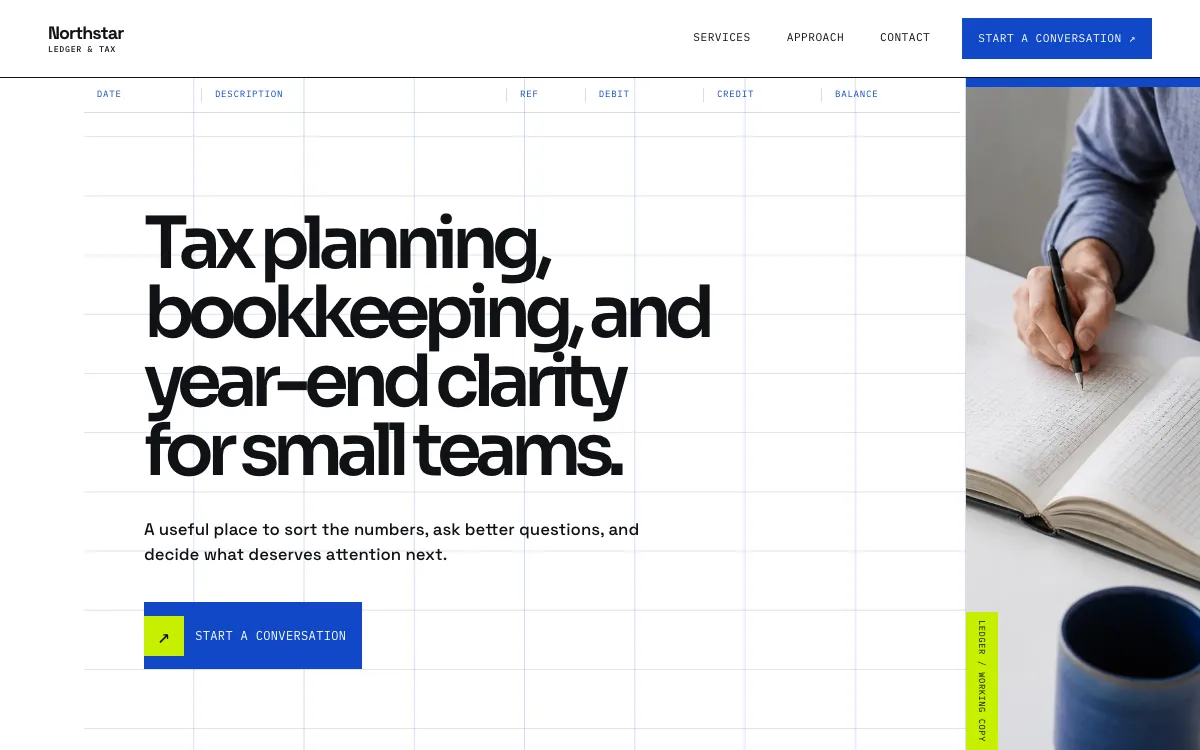
A service index with three tabs
Tax planning, monthly books and year-end each open a panel with one sentence on what the work is for and an "ask about" link that pre-selects the topic in the form. A visitor reads the one tab that applies and arrives at the request already sorted.
-
Three steps that explain the first meeting
Listen, sort, map. Three short steps tell a nervous owner what happens in a first conversation, so putting it off for another quarter gets harder.
-
A short form on purpose
Name, email and a topic selector. The form asks for nothing a client would hesitate to type into a website, and the design makes that restraint look like confidence.
Open the full accountant website design example to click through it as a phone or desktop visitor would, or browse more professional services website examples.
What to have ready for your brief
The brief takes about 3 minutes. Send what you have now; photos, documents and anything else on this list can follow by email.
- The services you offer and the ones you decline, such as audits or individual returns
- The client types you want more of, and the industries you know from the inside
- Your credentials as the issuing body lists them: CPA and the state, Enrolled Agent, bookkeeping certifications
- The firm's registered name and the owner's name, as your state board has them
- How you bill, and whether a first consultation is paid
- The portal and scheduling tools you use, so the login and Book buttons open the right places
- Your hours in and out of season, and whether you take new clients during tax season
What customers check before they call
- Credentials written exactly as the issuing board lists you, and none you do not hold
- The firm name on the site matching your state registration and your Google Business Profile
- A page that says how you bill before a client has to ask
- A clear statement that documents move through your portal, never a web form
- A photo and a few sentences about the person who will do the work
- Client words only where your professional rules allow them, and with permission
What an accountant website costs
An accountant website from FreeWebGuy is $0 to build and $15 a month for hosting once you approve it: $180 for the first year, plus a domain if you need one.
| Route | What it costs | First year | Who builds it |
|---|---|---|---|
| DIY website builder | $17 to $49 a month, billed yearly | $204 to $588 | You build it |
| Freelance web designer | $2,000 to $7,600 to build, plus hosting | $2,060 to $7,900 | They build it |
| Web design agency | $5,000 to $15,000 to build, plus hosting | $5,060 to $15,300 | They build it |
| FreeWebGuy | $0 to build, $15 a month | $180, plus a domain if you need one | We build it |
Sources: Wix plans; Squarespace pricing; WebsiteSetup: small business website costs (updated November 22, 2025); Ueni: average cost for a website (updated September 22, 2026); Clutch: web designer pricing (updated September 21, 2026)
An accounting practice's site is light on images and heavy on explanation; the $15 a month covers the whole site, and your portal provider bills the portal separately.
The pricing page lists what the $15 plan includes and what costs extra. To price your own situation, use the website cost calculator or compare FreeWebGuy with Wix, Squarespace and web designers.
Prefer to build it yourself?
Building your own accountant website works if you have the evenings for it. These five steps cover what the site needs on any website builder.
-
Choose a builder that lets you add a login button to your existing portal, and never collect documents through its forms.
-
Write one page per service in client language, then one short page per client type.
-
State your credentials exactly as issued and your firm name exactly as registered.
-
Add a how-we-bill page and a resources page with this year's deadlines.
-
Set a calendar reminder to change the home page lead in January, April and September.
For a page-by-page checklist, read What should be on a small business website? A page-by-page checklist.
How FreeWebGuy builds it
-
Send the brief
About 3 minutes
Tell us what you do and what you want visitors to do.
You pay $0
-
We build it
Within 48 hours of your brief
We use AI to build fast. A person checks every first version before you see it.
You pay $0
-
You review the preview
At your pace
Open the private link and tell us what to change.
You pay $0
-
Approve and go live
When you decide
When you approve the preview, you set up your SMBcrm account and card for the $15 hosting plan.
You pay $15 a month starts here
If you are not ready to launch, you owe nothing.
Questions accountants ask
Something else on your mind? Email hello@freewebguy.com. We reply within one business day.
How much does an accountant website cost?
An accountant or bookkeeper website from FreeWebGuy is $0 to build and $15 a month for hosting after you approve it, or $180 for the first year plus a domain if you need one. Service pages, client-type pages, a how-we-bill page, a portal login and a consultation request are included; the pricing page has the full list and the FAQ covers cancellation and ownership.
How do I create an accountant website?
Decide the services you want to be known for and the clients you want, write one page for each in their words, state your credentials and billing, link your portal for documents, and add a consultation request. Then build it yourself over a few weekends, or send FreeWebGuy a brief and review a first version within 48 hours.
What pages should an accounting firm website have?
Home, a page per service, a page per client type, about and credentials, how we bill, resources with deadlines, client login and a consultation request. Eight pages is plenty. A firm of 1 to 5 people does not need a blog, as long as each page answers one question fully.
Should an accountant website list prices?
List how you bill and what moves the number. Fixed-fee packages can show a starting point and what is included; hourly work, the rate and typical ranges for a return or a monthly close. Say what raises the price: entity type, transaction volume, cleanup from prior years. A client who knows the shape of the bill books the meeting.
Can clients send tax documents through the website?
No, and the site says so. The consultation request takes a name, a topic and a time frame. Documents, signatures and anything with a Social Security number go through the portal you already use, linked from a login button. That line protects the client and you.
Does a bookkeeper need a CPA to have a website?
No. Describe the bookkeeping, payroll and reporting you do, the software you work in and the clients you serve, and show the certifications you hold. The site uses the CPA title only for someone who holds that state license, because state boards of accountancy regulate it, and the IRS regulates the Enrolled Agent credential. FreeWebGuy follows those rules and does not give legal advice.
How should an accountant website change during tax season?
Three edits: the home page lead names the next deadline, a short notice says whether you are taking new clients and how long replies take, and the resources page lists what to bring. After the deadline, switch the lead to planning or bookkeeping using the site's AI builder; nothing else has to move.
Related industries and guides
- Website for law firms Practice areas, who you represent and a consultation request.
- Website for real estate agents The areas you know, your listings and a way for buyers and sellers to reach you.
- Website for nonprofits Mission, programs, a donate link and ways to volunteer.
- What should be on a small business website? A page-by-page checklist
- How much does a small business website cost in 2026?
- What does website maintenance cost per month?
- $0 to build
- First version within 48 hours of your brief
- $15 a month for hosting, only after you approve the preview and go live
- Month to month, no contract
When you approve the preview, you set up your SMBcrm account and card for the $15 hosting plan. That is the only time we ask for payment details.
