Websites for fitness studios
A website for your fitness studio, built for you
FreeWebGuy builds websites for gyms and fitness studios: $0 to build and $15 a month for hosting once you approve the site. The first version comes within 48 hours of your brief, with your class formats explained by level, prices in the open, a first-visit page for the nervous newcomer and a Book button that opens your scheduler.
Pay nothing until you approve it.
About 3 minutes. No credit card.
What a fitness studio website has to do
-
Get a first-timer through the door
The person reading your site at 10 p.m. has never been inside. They do not know what to wear, whether they will be the only beginner, where to park or what the first class costs. Each unknown is a reason to put it off another week. A first-visit page that answers them, in order, takes those reasons away.
-
Make the formats and the schedule legible
Reformer, mat, flow, HIIT, open gym: names that mean nothing to someone who has not tried them. Each format needs a short description, the level it suits and what a class feels like, and the schedule needs to be the live one from your booking system, not a PDF from January.
-
Show the people and the room
People choose a studio for the instructor and the space, so the site shows both: photos of a class in progress, short bios with the certifications your instructors hold, and the room as it looks on a Tuesday evening, with people in it.
The pages we build for a fitness studio
Your brief decides the final list. These are the pages most fitness studios need, and the job each one does.
| Page | Why it is there |
|---|---|
| Home | One line on who the studio is for, the formats, a Book button and a route to the first-visit page. |
| Classes | Each format with a short description, the level it suits, how long it runs and what to bring. |
| Schedule and booking | Your live schedule from the booking system you already use, with a Book button beside each class. |
| Pricing | Drop-in, class packs, memberships and the intro offer, each with its price and rules. |
| Your first visit | When to arrive, what to wear, where to park, lockers and showers, and what happens in the first ten minutes. |
| Instructors | Photos, a few sentences each and the certifications they hold. |
| Private sessions and small groups | How one-to-one and semi-private work, who they suit and how to request one. |
| Contact and location | Address, parking, transit, front-desk hours, and a way to ask a question. |
See a fitness studio website we designed
-
Three formats as a selector
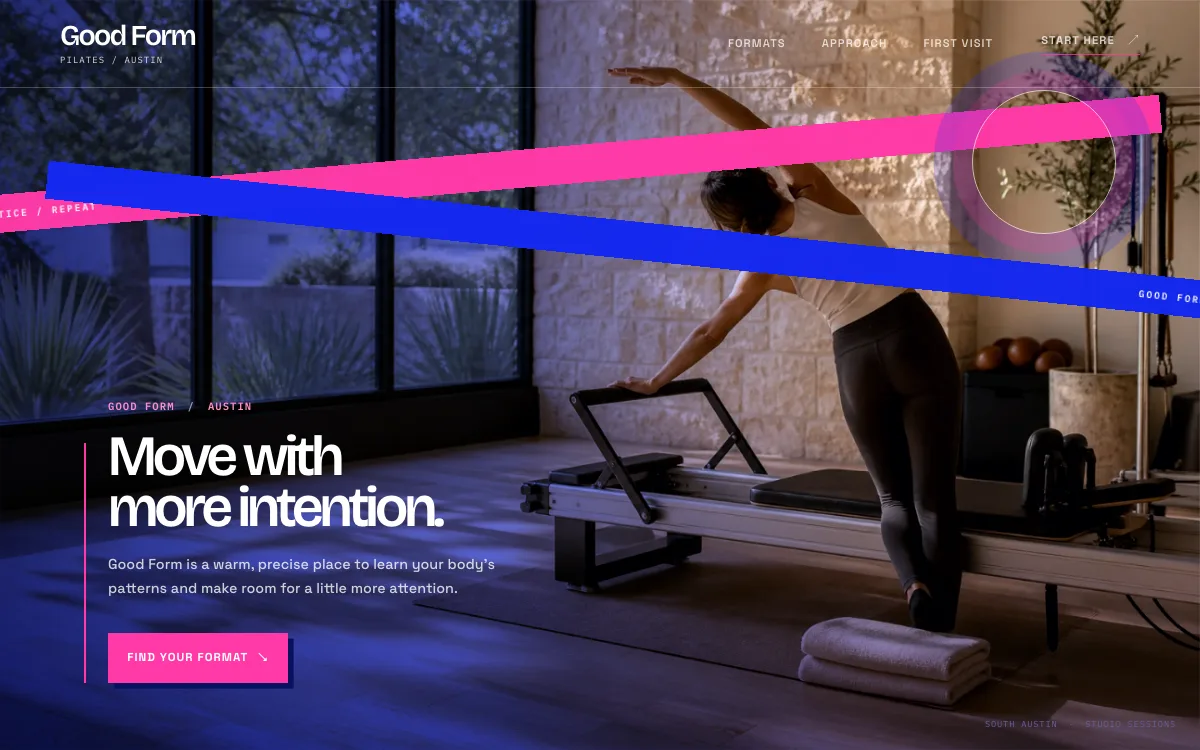
The design puts the class formats side by side as tabs. Choose one and the panel explains what the class is built around, who it suits and what to bring, with a link to ask a question.
-
A first visit in three steps
A numbered section walks through the first visit: say hello and get shown around, find the format that matches your pace, leave with a next step.
-
A question button, not only a Book button
The page closes with a request form for questions about the formats, the room or what to bring. Plenty of people need to ask one thing before they book anything.
Open the full fitness studio website design example to click through it as a phone or desktop visitor would, or browse more health and wellness website examples.
What to have ready for your brief
The brief takes about 3 minutes. Send what you have now; photos, documents and anything else on this list can follow by email.
- Your class formats, each with a one-line description and the level it suits
- Your booking system (Mindbody, Momence, Glofox, Acuity or another) and whether it offers an embed or a link
- Your prices: drop-in, packs, memberships, the intro offer and the cancellation policy you want shown
- Instructor names, photos and the certifications they hold
- First-visit details: arrival time, what to wear and bring, parking, lockers and showers
- 8 to 12 photos of the room in use, with the consent of anyone recognizable
- The waiver you already use, if any, so the site can link new members to it
- Your address, front-desk hours and Google Business Profile link
What customers check before they book
- Instructor certifications and training, named if your instructors hold them, with the issuing body
- Photos of your own room during a class
- Prices on the pricing page, including the intro offer and what happens when it ends
- A clear statement of which classes suit beginners, so a first-timer does not land in an advanced reformer class
- Reviews people can check. In BrightLocal's 2026 Local Consumer Review Survey, 54% of consumers said they visit a business's website after reading positive reviews (BrightLocal, 2026).
What a fitness studio website costs
A fitness studio website from FreeWebGuy is $0 to build and $15 a month for hosting once you approve it: $180 for the first year, plus a domain if you need one.
| Route | What it costs | First year | Who builds it |
|---|---|---|---|
| DIY website builder | $17 to $49 a month, billed yearly | $204 to $588 | You build it |
| Freelance web designer | $2,000 to $7,600 to build, plus hosting | $2,060 to $7,900 | They build it |
| Web design agency | $5,000 to $15,000 to build, plus hosting | $5,060 to $15,300 | They build it |
| FreeWebGuy | $0 to build, $15 a month | $180, plus a domain if you need one | We build it |
Sources: Wix plans; Squarespace pricing; WebsiteSetup: small business website costs (updated November 22, 2025); Ueni: average cost for a website (updated September 22, 2026); Clutch: web designer pricing (updated September 21, 2026)
A studio site with classes, pricing, a first-visit page, instructor bios and a Book button fits the standard build. Your class booking system keeps its own subscription; the site links to it or embeds it.
The pricing page lists what the $15 plan includes and what costs extra. To price your own situation, use the website cost calculator or compare FreeWebGuy with Wix, Squarespace and web designers.
Prefer to build it yourself?
Building your own fitness studio website works if you have the evenings for it. These five steps cover what the site needs on any website builder.
-
Pick a website builder and write one page per class format: what it is, who it suits, how long it runs and what to bring.
-
Embed or link your live schedule from your booking system and put a Book button next to it on every page.
-
Publish your prices, including the intro offer and the fine print on packs and memberships.
-
Write a first-visit page that answers arrival time, clothing, parking and what happens before the class starts.
-
Add instructor photos and bios with the certifications they hold, then book a class through the site yourself.
For a page-by-page checklist, read What should be on a small business website? A page-by-page checklist.
How FreeWebGuy builds it
-
Send the brief
About 3 minutes
Tell us what you do and what you want visitors to do.
You pay $0
-
We build it
Within 48 hours of your brief
We use AI to build fast. A person checks every first version before you see it.
You pay $0
-
You review the preview
At your pace
Open the private link and tell us what to change.
You pay $0
-
Approve and go live
When you decide
When you approve the preview, you set up your SMBcrm account and card for the $15 hosting plan.
You pay $15 a month starts here
If you are not ready to launch, you owe nothing.
Questions fitness studios ask
Something else on your mind? Email hello@freewebguy.com. We reply within one business day.
How much does a gym or fitness studio website cost?
A fitness studio website from FreeWebGuy is $0 to build and $15 a month for hosting once you approve it, which makes the first year $180 plus a domain if you need one. No setup fee and no contract. The pricing page has the full list.
What makes a good gym website design?
A good gym website design answers a newcomer's questions in the order they ask them: what kind of place is this, what are the classes, what do they cost, what happens on my first visit, how do I book. It uses photos of your own room, keeps a Book button on every screen and pulls the schedule live from the booking system.
Should a fitness studio put membership prices on its website?
Yes. A studio that hides prices is read as expensive, and the people who email to ask are the ones already half-decided. List drop-in, packs, memberships and the intro offer with their rules. If prices change seasonally, say so.
How does the class schedule work on the website?
The schedule comes from your booking system. If that system offers an embed, the live schedule sits on your schedule page and bookings happen there. If it offers only a link, the Book button opens it. Either way you maintain one schedule, and the website never shows a class that no longer exists.
Can a yoga, Pilates or barre studio use this kind of site?
Yes. The pages are the same for any class-based studio: formats, schedule, pricing, first visit, instructors, private sessions. What changes is the vocabulary and the tone. The example design on this page is a Pilates studio; a strength gym gets the same structure in a different voice.
What should a studio website say about a first class?
Everything a nervous person wants to know and will not ask: when to arrive, what to wear, whether to bring a mat or water, where to park, who to look for at the desk and what the first ten minutes are like. Then one sentence on what the intro offer costs and how to book it.
Does a gym website need a waiver or liability form?
If you use one, the site links to it so new members sign before they arrive. FreeWebGuy does not write waivers; that wording comes from your insurer or your attorney. The site's own forms collect only a name, an email and the class someone is interested in.
Related industries and guides
- Website for dentists Insurance answers, a first-visit walkthrough and a Book button.
- Website for hair salons A service menu with prices, your stylists' work and a Book button.
- Website for tutors Subjects, grade levels and a request for a first session.
- How much does a small business website cost in 2026?
- How to get Google reviews and show them on your website
- What should be on a small business website? A page-by-page checklist
- $0 to build
- First version within 48 hours of your brief
- $15 a month for hosting, only after you approve the preview and go live
- Month to month, no contract
When you approve the preview, you set up your SMBcrm account and card for the $15 hosting plan. That is the only time we ask for payment details.
