Websites for chiropractors
A website for your chiropractic practice, built for you
FreeWebGuy builds websites for chiropractors: $0 to build and $15 a month for hosting once you approve the site. Your first version arrives within 48 hours of your brief, with a first-visit walkthrough, the cash prices you publish, insurance answers and a visit request that leaves health details for your intake form. Pay nothing until you approve it.
Pay nothing until you approve it.
About 3 minutes. No credit card.
What a chiropractor website has to do
-
Explain the first visit before they book
Someone with a sore back who has never seen a chiropractor is weighing two worries: not knowing what happens in the room, and being talked into a long plan. A page that walks through the first hour in order, with the minutes each part takes, settles the first. A line that says nothing is paid ahead settles the second.
-
Put a number on it
Cost is the question patients ask before they ask about you. Cash prices for a first visit and a follow-up, X-rays priced only when the exam calls for them, and a sentence on how you check insurance benefits turn a vague worry into a figure they can plan around.
-
Take the request without the health history
A general contact form is the wrong place for symptoms. The request asks for a name, a way to reach them and the times they could come in, and tells them the health questions come later on your intake form. Your front desk still confirms every new patient by phone.
The pages we build for a chiropractic practice
Your brief decides the final list. These are the pages most chiropractors need, and the job each one does.
| Page | Why it is there |
|---|---|
| Home | The first visit in steps, what people come in for, your cash prices and hours, and a request button. |
| Your first visit | The hour in order: check-in, the conversation, the exam, when X-rays come up and when the patient hears what you found. |
| What we treat | The complaints you see most, in everyday words, with a note on when you send someone to a physician or physical therapist instead. |
| Cost and insurance | Cash prices, how a run of follow-ups adds up, which plans you bill and how the benefits check works. |
| Your chiropractors | Each doctor by name with the D.C. degree, state license, the days they are in and how they adjust. |
| Request a visit | Name, how to reply and preferred times. No symptoms and no member ID; those come by phone and on the intake form. |
See a chiropractor website we designed
-
The first hour, laid out along a spine
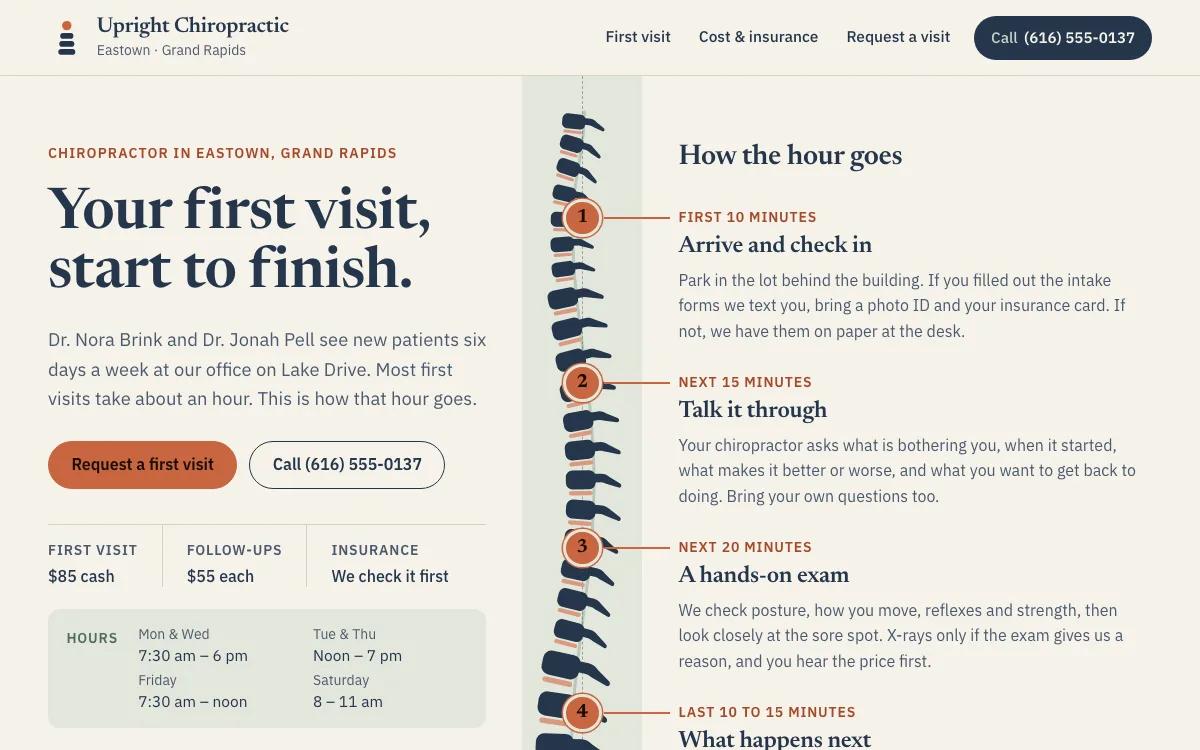
A side-on spine runs down the home page, and the four parts of a first visit branch off it with the minutes each one takes. A visitor reads arrive, talk, exam and next steps from top to bottom before they call.
-
A fee slip with an add-it-up counter
Cash prices for a first visit, a follow-up and X-rays sit on a receipt-style slip, with a line under it saying the office calls the patient's plan to check benefits first. On the cost page a counter adds up follow-up visits one at a time.
-
A visit request that asks no health questions
The form takes a name, a phone number, how to reply and the times that suit them, picked from a week grid with closed hours marked. One line asks the visitor to keep symptoms for the visit itself.
Open the full chiropractor website design example to click through it as a phone or desktop visitor would, or browse more health and wellness website examples.
What to have ready for your brief
The brief takes about 3 minutes. Send what you have now; photos, documents and anything else on this list can follow by email.
- How a first visit runs at your office: how long it takes, what happens in what order, and when X-rays come up
- Your cash prices for a first visit, a follow-up and X-rays, if you publish them
- The insurance plans you bill, whether you check benefits before the first visit, and how you handle auto claims
- Each chiropractor's name with the D.C. degree, state license, days in the office and how they adjust
- The scheduler you use, such as Jane or your practice software, or whether the front desk sets times by phone
- The link to your intake forms, so health history stays in your practice software
What customers check before they book
- Each doctor's D.C. degree and the license your state board issues, which a careful patient looks up
- A first-visit page that says what happens and how long it takes, for the patient who has never been adjusted
- Prices on the page and a line that nothing is paid ahead, because long packages are what patients warn each other about
- A request form that asks for contact details and times only; health details belong on your intake form
What a chiropractor website costs
A chiropractor website from FreeWebGuy is $0 to build and $15 a month for hosting once you approve it: $180 for the first year, plus a domain if you need one.
| Route | What it costs | First year | Who builds it |
|---|---|---|---|
| DIY website builder | $17 to $49 a month, billed yearly | $204 to $588 | You build it |
| Freelance web designer | $2,000 to $7,600 to build, plus hosting | $2,060 to $7,900 | They build it |
| Web design agency | $5,000 to $15,000 to build, plus hosting | $5,060 to $15,300 | They build it |
| FreeWebGuy | $0 to build, $15 a month | $180, plus a domain if you need one | We build it |
Sources: Wix plans; Squarespace pricing; WebsiteSetup: small business website costs (updated November 22, 2025); Ueni: average cost for a website (updated September 22, 2026); Clutch: web designer pricing (updated September 21, 2026)
The first-visit page, cost and insurance answers, doctor profiles and a visit request all fit the standard build. Intake forms stay in your practice software, and the site links to them.
The pricing page lists what the $15 plan includes and what costs extra. To price your own situation, use the website cost calculator or compare FreeWebGuy with Wix, Squarespace and web designers.
Prefer to build it yourself?
Building your own chiropractor website works if you have the evenings for it. These five steps cover what the site needs on any website builder.
-
Pick a builder whose forms let you remove the message box, so the request cannot collect symptoms.
-
Write the first visit as a timeline: what happens, in what order, how long, and when X-rays and costs come up.
-
Put your cash prices and a short insurance section on one page, with a line on how you check benefits.
-
Add each doctor with the D.C. degree, state license and days in the office, and link your intake forms.
-
Add the site to your Google Business Profile with the same name, address and phone, then send a test request from your phone.
For a page-by-page checklist, read What should be on a small business website? A page-by-page checklist.
How FreeWebGuy builds it
-
Send the brief
About 3 minutes
Tell us what you do and what you want visitors to do.
You pay $0
-
We build it
Within 48 hours of your brief
We use AI to build fast. A person checks every first version before you see it.
You pay $0
-
You review the preview
At your pace
Open the private link and tell us what to change.
You pay $0
-
Approve and go live
When you decide
When you approve the preview, you set up your SMBcrm account and card for the $15 hosting plan.
You pay $15 a month starts here
If you are not ready to launch, you owe nothing.
Questions chiropractors ask
Something else on your mind? Email hello@freewebguy.com. We reply within one business day.
How much does a chiropractor website cost?
A chiropractor website from FreeWebGuy is $0 to build, with hosting at $15 a month once you approve it, so the first year comes to $180 plus a domain if you need one, with no setup fee and no contract. Reasonable revisions before launch are included. We revise the preview with you until it matches your brief.
Does a chiropractic website need to be HIPAA compliant?
For the website itself, the question comes down to the forms. Keep the request form to name, contact details and preferred times, and send health history, medications and member IDs to the intake forms in your practice software. FreeWebGuy's Terms do not permit health information through a general-purpose form unless that use is approved in writing and a suitable service is set up.
What can a chiropractic website say about conditions and results?
Name the complaints you see most, say that the first visit decides whether chiropractic care fits, and stop there. The FTC treats a benefit claimed without evidence as deceptive, state advertising rules such as Michigan's call a promised cure or guaranteed result misleading, and a testimonial that overstates typical results needs more than a "results vary" line.
Should a chiropractic website advertise a new-patient special?
Only after you have checked how your state board and the federal rules on patient inducements treat it; a waived copay or deductible offered to Medicare patients is the one the federal statute names. A flat cash price for the first visit, the same for everyone, does the same job without fine print and does not read as bait for a package.
How should a chiropractic website explain insurance coverage?
Say which plans you bill, that coverage varies by plan, deductible and the reason for the visit, and how a patient finds out before the first visit. Note which parts a plan may not cover, such as the exam or X-rays, so the bill matches the page. Keep member IDs off the website and take them by phone.
Should a chiropractic website use an online scheduler or a request form?
Use the scheduler if your patients already book in Jane or your practice software, because they keep their logins and reminders. Use a request form if the front desk confirms every new patient by phone and checks benefits first. Either way, keep the first contact short.
Related industries and guides
- Website for dentists Insurance answers, a first-visit walkthrough and a Book button.
- Website for fitness studios Class types, the schedule and an easy first visit for newcomers.
- Website for veterinarians Services, new-client steps and an appointment request.
- How much does a small business website cost in 2026?
- What should be on a small business website? A page-by-page checklist
- How to get Google reviews and show them on your website
- $0 to build
- First version within 48 hours of your brief
- $15 a month for hosting, only after you approve the preview and go live
- Month to month, no contract
When you approve the preview, you set up your SMBcrm account and card for the $15 hosting plan. That is the only time we ask for payment details.
