Websites for tree services
A website for your tree service company, built for you
FreeWebGuy builds websites for tree services and arborists. Yours is $0 to build and $15 a month for hosting after you approve it, with a first version within 48 hours of your brief. It keeps storm and removal calls apart from planned pruning, and its request form asks for the address, the tree and a photo.
Pay nothing until you approve it.
About 3 minutes. No credit card.
What a tree service website has to do
-
Catch the storm call without losing the pruning job
A homeowner with a limb on the garage at 6 a.m. wants a phone number and a yes. One who wants the oak thinned before summer wants to read how you prune and what it costs. The home page gives the first a call button at the top of the screen and the second a path to pruning.
-
Answer the insurance question before it is asked
Tree work is dangerous and the customer knows it. Before they call, they look for who is climbing, whether you carry general liability and workers' compensation, and what the yard looks like when you leave. The site says so where the request starts, and shows finished jobs with the debris gone.
-
Get the assessment, not a guess over the phone
You cannot price a removal from a description. The request form asks for the address, which tree, what changed and a photo from the ground. You decide whether it needs a visit this week or a quote by email, and the customer is not waiting on a callback to find out.
The pages we build for a tree service company
Your brief decides the final list. These are the pages most tree services need, and the job each one does.
| Page | Why it is there |
|---|---|
| Home | A call button for storm damage, then the three visits you offer: pruning, removal and a health check. |
| Tree removal | When a tree should come down, how you work near houses and lines, and what happens to the wood and the stump. |
| Pruning and trimming | Structural pruning, crown reduction and clearance from roofs and lines, and why you don't top trees, if that is your practice. |
| Storm and emergency work | What counts as an emergency, when you answer, and what to do while they wait: keep people and cars away, never touch a line. |
| Plant health and risk assessments | Insect and disease visits, cabling and bracing, and written assessments, if you offer them. |
| Service area | The towns and counties you work in, and how far you travel for a large removal. |
| Request an assessment | Address, the tree, what changed and photos, so the first visit is the right one. |
See a tree service website we designed
-
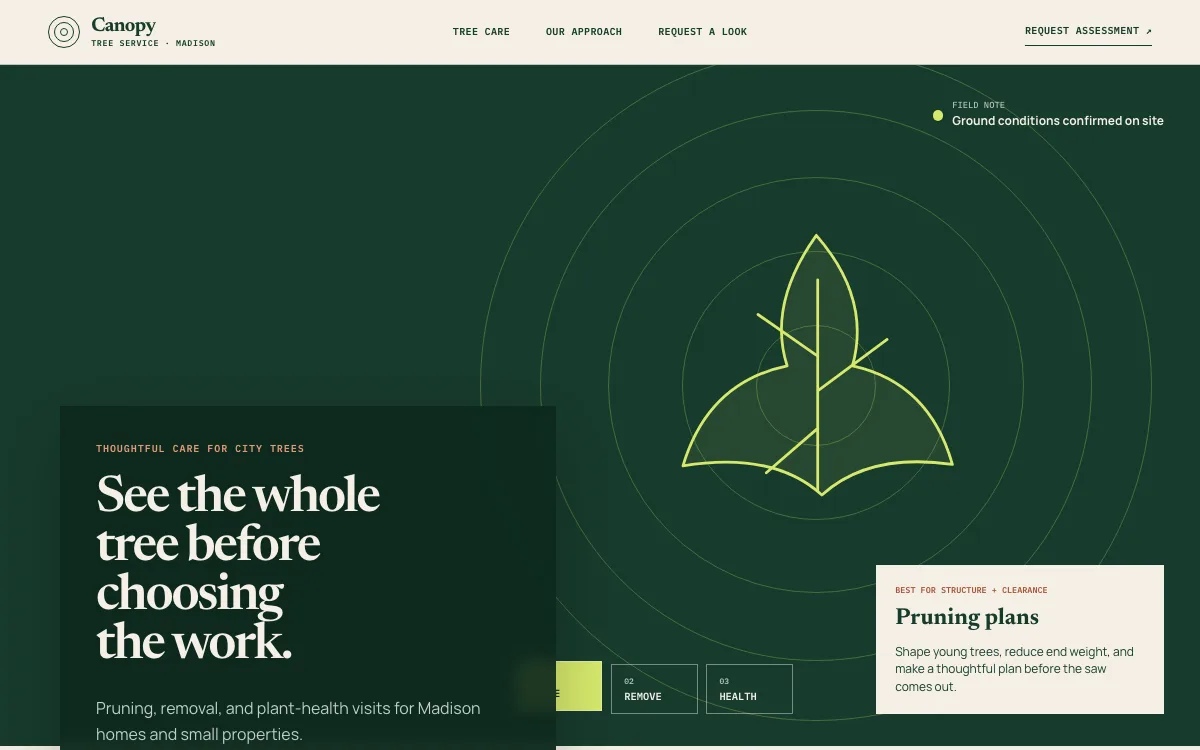
Prune, remove or check, from the first screen
The hero holds a three-button selector: pruning, removal and plant health. Each choice changes the description beside a drawing of the tree, so a visitor sorts their own job in seconds instead of reading a services list.
-
A three-step approach for nervous homeowners
Walk the site, choose the scope, work and reset. Three numbered steps tell a first-time customer what will happen, and that nothing comes down before they agree to it.
-
A request that starts with the tree
The closing section asks for the address, the tree you are worried about and what changed, then offers an email button. It sets up an assessment visit, which is how tree work is priced.
Open the full tree service website design example to click through it as a phone or desktop visitor would, or browse more home service website examples.
What to have ready for your brief
The brief takes about 3 minutes. Send what you have now; photos, documents and anything else on this list can follow by email.
- The services you offer and the ones you don't, such as stump grinding, lot clearing or firewood
- Whether you take storm calls, during what hours, and how a customer reaches you after hours
- Your insurance: general liability and workers' compensation, if you carry them
- ISA Certified Arborist or Tree Risk Assessment Qualification credentials, if anyone on the crew holds them, with their name
- The equipment that changes what you can take on: bucket truck, crane, climbing crew, chipper
- How you price: estimates at no charge, a minimum visit fee, hourly storm rates, whatever you actually do
- Photos from the ground of finished jobs, the crew at work and the yard after cleanup
What customers check before they call
- Insurance named where the request begins: general liability and workers' compensation, if you carry them
- The name of the person who holds an ISA Certified Arborist credential, if you have one; a homeowner can verify it in the ISA Find an Arborist directory
- Photos of finished removals with the cleanup done, taken from where the customer stands
- TCIA accreditation, if your company holds it; the TCIA accreditation program checks insurance and licenses on a schedule
- Reviews that mention the crew arriving when promised and leaving the yard clean
What a tree service website costs
A tree service website from FreeWebGuy is $0 to build and $15 a month for hosting once you approve it: $180 for the first year, plus a domain if you need one.
| Route | What it costs | First year | Who builds it |
|---|---|---|---|
| DIY website builder | $17 to $49 a month, billed yearly | $204 to $588 | You build it |
| Freelance web designer | $2,000 to $7,600 to build, plus hosting | $2,060 to $7,900 | They build it |
| Web design agency | $5,000 to $15,000 to build, plus hosting | $5,060 to $15,300 | They build it |
| FreeWebGuy | $0 to build, $15 a month | $180, plus a domain if you need one | We build it |
Sources: Wix plans; Squarespace pricing; WebsiteSetup: small business website costs (updated November 22, 2025); Ueni: average cost for a website (updated September 22, 2026); Clutch: web designer pricing (updated September 21, 2026)
A tree service site carries a storm call path, an assessment request and a gallery, and the $15 a month does not go up in a storm season when the phone is busiest.
The pricing page lists what the $15 plan includes and what costs extra. To price your own situation, use the website cost calculator or compare FreeWebGuy with Wix, Squarespace and web designers.
Prefer to build it yourself?
Building your own tree service website works if you have the evenings for it. These five steps cover what the site needs on any website builder.
-
Pick a builder whose forms accept a photo and whose call button stays visible on a phone.
-
Write one page each for removal, pruning and storm work; one page for everything buries the emergency path.
-
Put your insurance, credentials and coverage area on the home page, not only on an about page.
-
Photograph every job from the same spot before and after, and label removals by tree size and access.
-
Link the site from your Google Business Profile and add a photo there whenever you add one to the site.
For a page-by-page checklist, read What should be on a small business website? A page-by-page checklist.
How FreeWebGuy builds it
-
Send the brief
About 3 minutes
Tell us what you do and what you want visitors to do.
You pay $0
-
We build it
Within 48 hours of your brief
We use AI to build fast. A person checks every first version before you see it.
You pay $0
-
You review the preview
At your pace
Open the private link and tell us what to change.
You pay $0
-
Approve and go live
When you decide
When you approve the preview, you set up your SMBcrm account and card for the $15 hosting plan.
You pay $15 a month starts here
If you are not ready to launch, you owe nothing.
Questions tree services ask
Something else on your mind? Email hello@freewebguy.com. We reply within one business day.
How much does a tree service website cost?
A tree service website from FreeWebGuy is $0 to build and $15 a month for hosting after you approve it, which is $180 for the first year plus a domain if you need one. Service pages, a storm call path and an assessment request are included; the pricing page lists the rest, and how it works covers the preview and approval.
What should a tree service website include?
A call button at the top of every page, separate pages for removal, pruning and storm work, your service area, your insurance and credentials in plain words, photos of finished jobs, and a request form that asks for the address, the tree and a photo. If you also run a landscaping crew, the website for landscapers page covers that side.
How should a tree service website handle emergency and storm calls?
Make the call button the first thing on the screen, say when you answer and how soon you can look, and add two lines of advice: keep people and vehicles away from the tree, and never go near a limb touching a power line. If you don't do emergency work, say so, and the site sends those visitors elsewhere.
Should a tree service list prices on its website?
List how you price rather than fixed numbers. Removal depends on height, access, what the tree hangs over and what happens to the wood, so a range per visit type, plus the things that move it, saves you quoting jobs you will never win. If you charge for estimates or have a minimum, say so.
How do I show I am an ISA Certified Arborist on my website?
Name the person who holds the credential and the credential itself, exactly as the International Society of Arboriculture lists it, and link to the ISA directory so a customer can verify it. The credential belongs to the person, not the company, so the site never says the company is certified.
Can customers send photos of a tree through the website?
Yes. The assessment request asks for the address, which tree, what changed and a photo from the ground. It arrives in your inbox with the photo attached, you decide whether it needs a visit or a quick reply, and the customer knows which to expect.
Should a tree service website mention permits?
Briefly, yes. Some cities require a permit before a tree above a certain size comes down or a protected species is pruned. If you handle the permit as part of the job, one sentence on the removal page tells a homeowner the paperwork is covered. Your city's rules decide the details.
Related industries and guides
- Website for landscapers Keep the weekly mowing customer and the patio-and-planting project on their own paths.
- Website for roofers An inspection request, a step-by-step process and photos of roofs you have finished.
- Website for junk removal companies A load-size price guide, an accepted-items list and a pickup-window request.
- Local SEO checklist for service businesses
- What should be on a small business website? A page-by-page checklist
- How to get Google reviews and show them on your website
- $0 to build
- First version within 48 hours of your brief
- $15 a month for hosting, only after you approve the preview and go live
- Month to month, no contract
When you approve the preview, you set up your SMBcrm account and card for the $15 hosting plan. That is the only time we ask for payment details.
