Websites for barbershops
A website for your barbershop, built for you
FreeWebGuy builds websites for barbershops and independent barbers: $0 to build and $15 a month for hosting once you approve the site. Your first version arrives within 48 hours of your brief, with a price board that shows chair times, walk-in and appointment hours for each day, barber cards and a request-a-chair form. Pay nothing until you approve it.
Pay nothing until you approve it.
About 3 minutes. No credit card.
What a barbershop website has to do
-
Put the price and the chair time where people look first
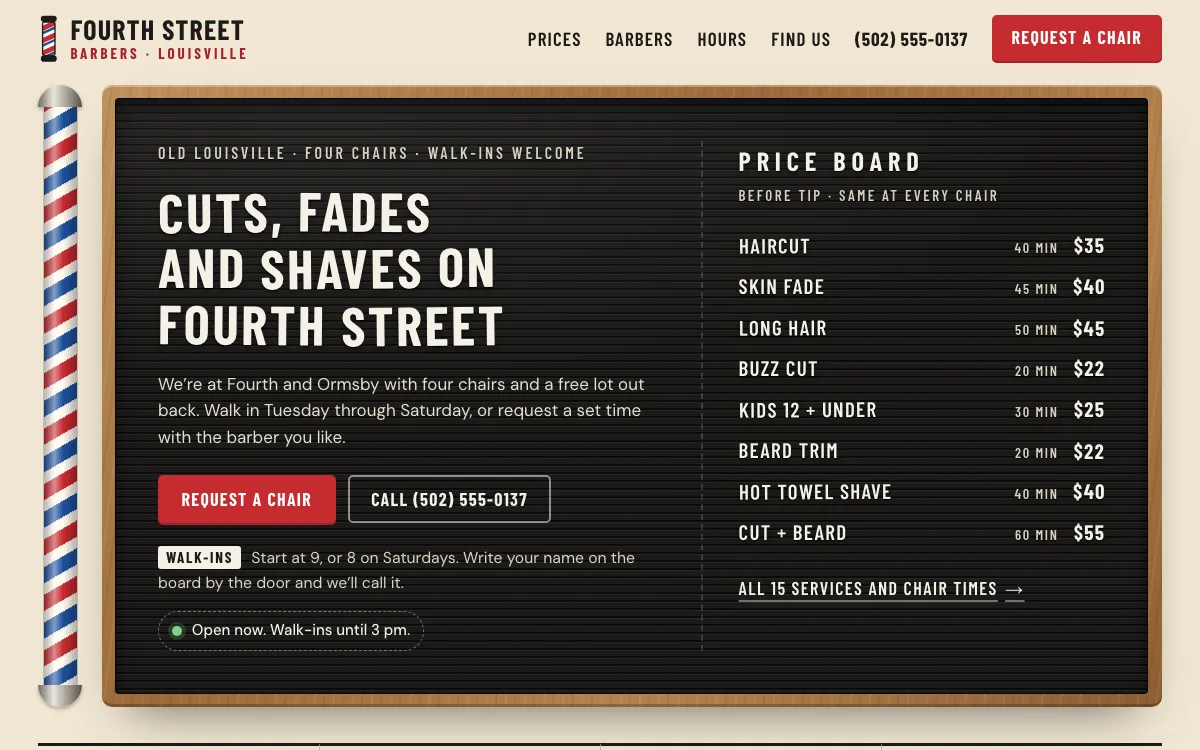
Someone deciding between your shop and the one two blocks over wants to know what a cut costs and how long they will sit. A price board on the home page, with the minutes beside each service, answers both before they call. Most shop sites keep prices off the first screen, so a short board stands out.
-
Settle walk-in or appointment, day by day
A shop that takes walk-ins in the morning and holds chairs for appointments later confuses people when the site only says "walk-ins welcome". Show both windows for every day, say what to do when you arrive, and the person on the sidewalk stops wondering whether to push the door.
-
Let regulars find their barber
Regulars come back for a barber. A card for each one, with what they are known for and the days they work, lets a regular check that their barber is in before driving over, and lets a new customer pick the chair that fits the cut they want.
The pages we build for a barbershop
Your brief decides the final list. These are the pages most barbershops need, and the job each one does.
| Page | Why it is there |
|---|---|
| Home | The price board, walk-in and appointment hours, an open-now line and a request button, before the first scroll. |
| Prices and chair times | Every service with its price and the minutes it takes, grouped like your wall board. |
| Hours | A walk-in window and an appointment window for each day, and how the walk-in list works. |
| The barbers | One card per barber: first name, chair, what they are known for and the days they are in. |
| Shop rules | Late arrivals, cancellations, kids, paying and tipping, in your own words. |
| Find us | Address, parking, phone and text, and a license line where your state issues one. |
| Request a chair | Barber, service, day and time window, sent to your phone, and how you confirm. |
See a barbershop website we designed
-
A price board that reads like the one on your wall
The first screen is a letterboard: each service on its own line, the minutes it takes in the middle and the price at the end. A visitor knows the time and cost of a cut before tapping anything.
-
Walk-in and appointment hours on one table
Each day has a walk-in column and an appointment column, with today marked. A status line under the headline says whether the shop is open right now and when walk-ins run next.
-
Barber cards with a who-is-in day picker
Every barber gets a card with a chair number, what they cut best and the days they work. Tap a day above the cards and whoever is off greys out, and each card links to a request with that barber already picked.
Open the full barbershop website design example to click through it as a phone or desktop visitor would, or browse more salon, pet and personal care website examples.
What to have ready for your brief
The brief takes about 3 minutes. Send what you have now; photos, documents and anything else on this list can follow by email.
- Your services with a price and the minutes each takes in the chair, or the reason you keep prices off the site
- The hours you take walk-ins and the hours you hold for appointments each day, and how the walk-in list works
- A first name, chair number and specialty line for each barber, plus the days they are in
- Your rules on late arrivals, cancellations, no-shows, kids and tipping, as you say them at the register
- How you take appointments now: Booksy, Squire, Square Appointments, texts or the phone
- Your state barber and shop licenses, where your state issues them and you want them named
What customers check before they book
- A price board they can read before walking in, since a price first heard in the chair feels like a surprise
- Walk-in hours that match your door, your Google listing and your booking page, since wrong hours mean wasted trips and bad reviews
- Your late and cancellation rules posted next to the request button, not met for the first time in a reminder text
- Barber and shop licenses named where your state issues them, in the exact title printed on the license
What a barbershop website costs
A barbershop website from FreeWebGuy is $0 to build and $15 a month for hosting once you approve it: $180 for the first year, plus a domain if you need one.
| Route | What it costs | First year | Who builds it |
|---|---|---|---|
| DIY website builder | $17 to $49 a month, billed yearly | $204 to $588 | You build it |
| Freelance web designer | $2,000 to $7,600 to build, plus hosting | $2,060 to $7,900 | They build it |
| Web design agency | $5,000 to $15,000 to build, plus hosting | $5,060 to $15,300 | They build it |
| FreeWebGuy | $0 to build, $15 a month | $180, plus a domain if you need one | We build it |
Sources: Wix plans; Squarespace pricing; WebsiteSetup: small business website costs (updated November 22, 2025); Ueni: average cost for a website (updated September 22, 2026); Clutch: web designer pricing (updated September 21, 2026)
A price board, an hours table, barber cards and a request form fit the standard build. Deposits and cards on file stay in your scheduler, which charges its own processing fees.
The pricing page lists what the $15 plan includes and what costs extra. To price your own situation, use the website cost calculator or compare FreeWebGuy with Wix, Squarespace and web designers.
Prefer to build it yourself?
Building your own barbershop website works if you have the evenings for it. These five steps cover what the site needs on any website builder.
-
Pick a builder that can lay out a price list in columns: service, minutes and price on one line.
-
Write an hours table with a walk-in column and an appointment column for every day, plus a line on what to do when you arrive.
-
Give each barber a card with a first name, what they cut and the days they work, linked to your booking page or phone number.
-
Post your late, cancellation, kids and tipping rules on the home page, each one a sentence or two.
-
Put the site link and the same hours on your Google Business Profile, then have a friend work out from the site alone whether to walk in on a Monday.
For a page-by-page checklist, read What should be on a small business website? A page-by-page checklist.
How FreeWebGuy builds it
-
Send the brief
About 3 minutes
Tell us what you do and what you want visitors to do.
You pay $0
-
We build it
Within 48 hours of your brief
We use AI to build fast. A person checks every first version before you see it.
You pay $0
-
You review the preview
At your pace
Open the private link and tell us what to change.
You pay $0
-
Approve and go live
When you decide
When you approve the preview, you set up your SMBcrm account and card for the $15 hosting plan.
You pay $15 a month starts here
If you are not ready to launch, you owe nothing.
Questions barbershops ask
Something else on your mind? Email hello@freewebguy.com. We reply within one business day.
How much does a barbershop website cost?
A barbershop website from FreeWebGuy is $0 to build, with hosting at $15 a month once you approve it. Year one comes to $180 plus a domain if you need one, with no setup fee and no contract. The price board, hours table, barber cards and request-a-chair form are part of the build.
Do barbers need a website if the shop already takes bookings on Booksy or Squire?
A booking app page is where people book once they have chosen you. A website is where they choose: it holds the walk-in hours, the barbers, the rules and the photos, in your own layout rather than beside other shops on the same app. Keep both, and point the Book button at the app.
How do I show walk-in hours and appointment hours without confusing people?
Put them in one table with a column for each, day by day, instead of a single set of hours and a "walk-ins welcome" line. Say what to do when you arrive, and mark any day that is appointment only. Then make your Google listing match the table; when two places show different hours, people trust neither.
Where should the late, no-show and kids rules go on a barbershop website?
Next to the Book button, and again on the home page, in the words you use at the register. Notice window first, then what happens: how late is too late, what a missed appointment costs, whether a parent stays for a kid's cut. A rule that only lives in a confirmation email gets read too late.
Does a barbershop website need to mention the state barber license?
Mention it where your state issues one, and only while it is current. Kentucky, for example, licenses each barber and the shop itself through the Kentucky Board of Barbering, and a license there lapses each year unless renewed. Link to the state lookup rather than printing a number, and skip "master barber" unless your state issues that class.
Which comes first, the Google Business Profile or the website?
The profile. It costs nothing, it shows on the map, and it holds your hours, photos, services and reviews. The website comes second: it puts the walk-in hours and the rules where you want them, and it gives the profile a link, which makes the shop look more established than a listing without one. Keep the hours identical in both.
Related industries and guides
- Website for hair salons A service menu with prices, your stylists' work and a Book button.
- Website for tattoo studios Artist portfolios, studio policies and a consultation request.
- Website for pet groomers Packages by pet size, the area you cover and a meet-and-greet request.
- Google Business Profile websites shut down: what to do now
- How to get Google reviews and show them on your website
- How much does a small business website cost in 2026?
- $0 to build
- First version within 48 hours of your brief
- $15 a month for hosting, only after you approve the preview and go live
- Month to month, no contract
When you approve the preview, you set up your SMBcrm account and card for the $15 hosting plan. That is the only time we ask for payment details.
